
Convert Text to Outlines in Illustrator, InDesign and Photoshop Before You Send Print Files


Emma is our prepress and print production voice, built from the knowledge of our production team, with over 20 years in printing.
The command takes two seconds. Knowing which files need it, which files it damages, and how to prove it worked is the part that keeps a job off the reprint pile.
In Illustrator, unlock everything, press Cmd+A to select all, then run Type then Create Outlines, or Shift+Cmd+O on Mac and Shift+Ctrl+O on Windows. That redraws every glyph as a vector path, so the press sets your type from geometry instead of hunting for a font file it does not have. Confirm it with Type then Find Font: an empty list means no live text is left. Outline a copy, never your master, because the change cannot be reversed once the file is saved and closed.
Quick answer
Paths instead of a font reference
Outlining converts each letter into a closed vector path, which removes the font from the equation entirely. The artwork looks the same and prints the same, but nothing has to be installed, matched by version or licensed at the other end. The cost is everything a text object gives you: editing, spell check, search and accessibility all go with it. That is why outlining suits logos, cards and display artwork, while a PDF/X export with embedded fonts suits anything long, anything still in proof, or anything that also lives as a digital file.
Why Fonts Break Between Your Machine and the Press
A font is a separate file. Your layout does not contain it, it points at it, and the moment the artwork leaves your machine that pointer can fail. Four things go wrong often enough to be worth naming.
- The font never traveled. Native .ai and .indd files reference fonts by name. Open one on a machine without them and the app substitutes, usually with something wider or narrower, and every line break in the document moves.
- The license blocked the embed. OpenType files carry an embedding permission flag. When a foundry sets it to restricted, Acrobat and the export engine refuse to write the font into the PDF, and you get a preflight warning rather than a silent success.
- The font was a Type 1. Adobe ended Type 1 support across Illustrator, InDesign and Photoshop in 2023. Old logo files still carry Type 1 type, and current apps simply will not render it.
- Two fonts share a name. The Helvetica on a 2011 Mac and the Helvetica on a 2024 one are not the same file. The document opens without a warning, then sets one word wider and pushes a headline onto a second line.
None of these show up as an error on your screen. They show up on the proof, or on a thousand printed flyers, which is why the font question gets settled before upload rather than after. If you are chasing a font choice rather than a font failure, our notes on Google Fonts licensing for commercial print cover which files you are actually allowed to send.
What Converting Text to Outlines Actually Does
Create Outlines reads the glyph shapes out of the font and redraws each one as a closed vector path made of Bezier anchor points. A capital R stops being the character R and becomes a compound path with a counter cut out of it. The shape on the page does not change. The dependency does: the file now describes the letter geometrically instead of asking a font to supply it.
That trade is worth understanding in both directions. You gain a file that sets identically on any RIP, on any machine, in any year, with no font to install and no substitution to catch. You lose the text: no editing, no spell check, no search, no screen reader, and no way back once the file is saved and closed.
Two beliefs about outlining are worth correcting. It does not shrink your file, and for text-heavy pages it usually grows it, because a paragraph that was a few hundred characters becomes several thousand anchor points. It also does not improve print quality. Hinting only guides screen rendering, so an outlined headline and a live one image identically on plate.
The diagram above puts the three states side by side. Whichever you send us, the trim, bleed and safety rules stay the same, and the bleed, cut line and safety checklist is the one to run alongside this page.
How to Outline Text in Adobe Illustrator
Illustrator is where outlining belongs, because it handles logos, cards and single-page artwork where the type is display rather than editorial. Work on a copy, not the master.
- Save the copy first. File then Save As, and name it something that tells you what it is, like menu-print-outlined.ai. The master with live text stays untouched.
- Unlock and unhide. Object then Unlock All, then Object then Show All. Locked and hidden layers are the classic hiding place for a stray live text frame.
- Expand appearance on styled type. If a headline carries a stroke, a drop shadow, a warp or a graphic style, run Object then Expand Appearance first. Outlining styled type without expanding can shift the stroke to the wrong side of the new path.
- Expand symbols. Select any symbol instance and use Object then Expand. Create Outlines will not reach type inside a symbol or inside a linked placed file.
- Select all, then outline. Cmd+A or Ctrl+A, then Type then Create Outlines, or Shift+Cmd+O on Mac and Shift+Ctrl+O on Windows.
- Prove it with Find Font. Type then Find Font. An empty list means the document holds no live type at all. A single entry means something was locked, hidden, symbolised or sitting on the pasteboard.
For the Illustrator-only walk-through, including what happens to text on a path and to warped type, our companion guide on converting text to shapes in Illustrator goes deeper on the same command. If you are setting up a card from scratch, start from a correctly sized file in the blank template library and read business card outline and file setup before you place a single letter.
How to Outline Text in InDesign and Photoshop
Both apps have the command. In both, reaching for it is usually the wrong move, and it helps to know why before you use it anyway.
InDesign. Select the frame with the black arrow, not the text cursor, then Type then Create Outlines, Shift+Cmd+O. Select the frame and the whole thing converts to a group of paths. Put the cursor inside the text instead and InDesign converts the selected characters into inline anchored objects, which is rarely what anyone wants. The cost is real: threaded frames break apart, hyperlinks and index markers disappear, table cells lose their structure, and optical margin alignment is frozen wherever it happened to sit. For a multi-page brochure or a booklet, export PDF/X-1a:2001 or PDF/X-4 and let the fonts embed. That is the standard route described in exporting a print-ready PDF from Illustrator or InDesign.
Photoshop. Right-click a type layer and pick Convert to Shape to get a real vector shape layer with editable paths, or Rasterize Type to bake the letters into pixels at the document resolution. Convert to Shape is the safer choice because the edges stay resolution independent, and our guide on how to convert text to a shape in Photoshop for print-ready files walks the layer steps. Rasterize locks the type at whatever the file is set to, so a 300 dpi document rasterises at 300 dpi and cannot be scaled up afterwards without softening. If the artwork is going out as a flattened TIFF or JPEG anyway, the fonts are already gone and the question is moot.
Photoshop is also where the resolution decision lands rather than the font decision. Our smallest printable font size notes cover where type stops holding on coated stock, which matters more than outlining for legal lines and disclaimers.
Outlines vs Embedded Fonts, Compared Properly
Printers ask for outlined files out of habit, from an era when PDF embedding was unreliable. Both routes work now, and they fail in different places.
| Approach | What travels | Still editable | Where it fails | Best for |
|---|---|---|---|---|
| Embedded fonts | The font data is written inside the PDF. | Yes, in Acrobat and in the source file. | Restricted license flags, Type 1 fonts, and printers who want native artwork. | Multi-page InDesign work, anything also used as a digital PDF. |
| Converted to outlines | Vector paths only, no font reference at all. | No, the text is art from that point on. | Any late edit, spell check, accessibility or search requirement. | Logos, business cards, single-page display artwork, awkward licences. |
| Rasterised type | Pixels at one fixed resolution. | No, and the edges are locked to the dpi. | Scaling up, small type, and anything needing a crisp vector edge. | Type baked into a photographic composite that ships flat. |
Read the fourth column before the second. Embedding fails on a license flag or a legacy font, and outlining fails on a change of mind. Most jobs never hit the first problem and hit the second constantly, which is the honest argument for embedding by default. Outline when the font itself is the obstacle, or when the artwork is a mark rather than a text block. Embedding fonts in Illustrator for print covers the settings, and choosing the right file type for printing covers which container to send.
When You Should Leave the Text Live
There are jobs where outlining costs more than it protects, and they are easy to spot once you look for them.
- The proof round is not finished. A price, a date, a phone number or a legal line is going to change. Outlined type means rebuilding the headline from the master rather than clicking into it.
- The file doubles as a digital PDF. Outlined text has no text layer, so search finds nothing and a screen reader reads nothing. A menu, a rate card or a spec sheet that also gets emailed should stay live.
- It is a long document. Outlining a 32-page booklet turns clean editorial text into tens of thousands of paths, slows every page in Acrobat, and gains nothing a PDF/X export was not already doing.
- Someone still has to spell check it. Once the text is art, no tool will ever flag a typo again. Run the check before Create Outlines, not after.
- The stock or size is still moving. Reflowing a page after a size change is far easier with live text, and paper choices shift more often than people expect.
The compromise most studios settle on is simple. Approve the proof with live text, outline afterwards, and send the outlined copy for the production run. If you want us to check the file before the run, how proofing works in printing explains what each proof type does and does not catch. Postcards make the point plainly: standard postcards start at $16.48, and a reprint because a phone number changed costs the full run again.
The File Check Before You Upload to 4OVER4.COM
Run this in order. It takes about three minutes and it catches the failures that turn into reprints.
- Master saved separately. The live-text version exists under its own name and is not the file you are about to upload.
- Spell check done. Before Create Outlines, because there is no after.
- Appearance expanded. Strokes, warps, shadows and graphic styles on type expanded before outlining.
- Find Font empty. Illustrator: Type then Find Font shows nothing. Acrobat: the Fonts tab in Document Properties is empty for an outlined file, or lists every font as Embedded Subset for an embedded one.
- Color is CMYK. No stray RGB swatch left behind in a converted logo.
- Bleed and safety respected. Artwork extends past the trim, nothing important sits near the cut line.
- Exported as PDF/X-1a:2001 or PDF/X-4. Unless the product page asks for something else.
| Product | Common trim size | Outline or embed |
|---|---|---|
| Business cards | 2 by 3.5 inches | Outline the name and logo once the proof is approved |
| Flyers | 8.5 by 11 inches, among nine sizes | Either, embed if the text may still change |
| Postcards | 4 by 6 inches, among 14 sizes | Keep the mailing panel live until the proof is final |
| Brochures | 8.5 by 11 inches, among six sizes | Embed through PDF/X for multi-panel text |
Upload it on the product page and the configurator prices the job as you choose stock, quantity and turnaround. Standard brochures start at $57.11, standard flyers at $39.54, and standard business cards at $17.57, so the cost of a careless font is usually larger than the cost of the check. For the full handoff from color mode to packaging, creating commercial print-ready files is the longer read, and brochure printing lists every fold and stock we run.
Wally explains outlining
The press cannot borrow a font it does not have
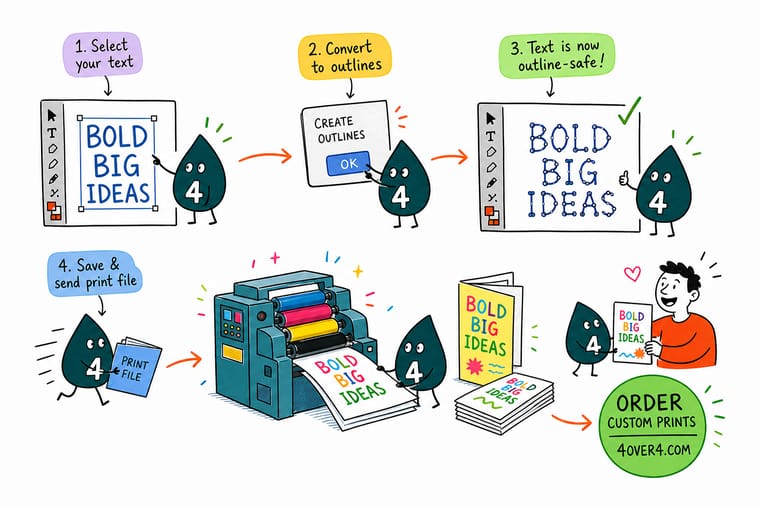
Wally opens your file and the press asks one question: where is that font? Live text points at a file sitting on your machine, and a machine that cannot find it picks something else. Create Outlines answers the question by removing it. Every letter becomes a shape with anchor points, so there is nothing left to look up. Wally keeps the editable master in a drawer, because outlined type is a picture of words, and pictures do not take corrections.
Print your outlined file on brochures →
Specs and pricing
Sizes, stocks and starting prices for the products people outline files for
Configure the job the way you would order it, with live options and starting prices straight from the 4OVER4.COM configurator. Brochures start at 50 for $57.11 in six sizes on four stocks, flyers at 50 for $39.54 in nine sizes on seven stocks, and postcards at 50 for $16.48 in 14 sizes, all with 3 business days of production.
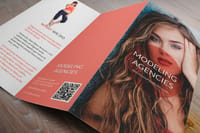


Print it
Send the outlined file and let us print it
Upload the outlined or embedded PDF/X to brochures from $57.11, flyers from $39.54 or standard business cards from $17.57 for 100, and it prints in 3 business days once it clears the file check.



Explore more
Where to go next
Walk the Illustrator Create Outlines steps with their stroke and warp traps, embed fonts instead when you can, export a PDF/X with the right settings, and run the full print-ready file handoff, then shop brochure printing.



By the numbers
Print-ready files handled every day at 4OVER4
Common Questions
Your outlining questions, answered
How do I convert text to outlines in Illustrator?
Unlock everything with Object then Unlock All, choose Select then All, then run Type then Create Outlines. The shortcut is Shift+Cmd+O on Mac and Shift+Ctrl+O on Windows. Each text object turns into a group of compound paths that look identical and carry no font reference. Then open Type then Find Font: if the list is empty, no live type is left anywhere in the document, including hidden layers and pasteboard leftovers.
Can I undo Create Outlines after I save the file?
No. Undo works inside the open session, and that is the whole window you get. Once the file is saved and closed, the glyphs are paths and there is no command that turns paths back into editable type. The habit that saves you is a two file workflow: keep yourname-master.ai with live text, then File then Save As a second file named yourname-print.ai, outline that one, and send only the outlined copy.
Do I still need to outline text if I export a print-ready PDF?
Usually not. A PDF/X-1a or PDF/X-4 export embeds the font data inside the PDF, so the RIP sets your type from the file itself. Outlining is the fallback for the cases embedding cannot cover: a font whose license sets the no-embedding permission flag, an old Type 1 font that current Adobe apps no longer render, or a printer who wants native .ai artwork rather than a PDF. If none of those apply, embed and keep the text searchable.
Why did my layout shift after I converted text to outlines?
Almost always because the type was already being substituted before you outlined it, so you froze the substitute rather than your font. Open the file, let the missing font dialog appear, install or replace the font, and check the line breaks before you run Create Outlines. The other cause is optical margin alignment in InDesign, which nudges punctuation into the margin and is baked in the moment the text becomes art.
What happens to text inside a symbol or a placed file?
Create Outlines skips it, which is how live type sneaks into a supposedly outlined file. Expand any symbol with Object then Expand before you outline, and either embed a placed .ai or .eps and expand it, or outline the original and relink. Find Font catches both cases, which is why it is the last step and not an optional one.
Does outlining make small type print heavier?
On press, no. Hinting is a screen rendering aid, so losing it changes the on-screen proof slightly and changes nothing at 2400 dpi on plate. What does matter at small sizes is the size itself: below about 6 point, thin serifs and reversed type start to fill in on coated stock regardless of whether the type is live or outlined.
Get Started
File outlined and checked? Send it over.
Pick the product, choose stock and quantity, upload the outlined PDF, and we set your type exactly as you drew it with no font to chase.
Legal Disclaimer
Gold Standard guarantees apply to all standard orders placed through 4over4.com. Price match requires verifiable proof of a competitor's published price for an equivalent product with matching specifications and turnaround time. Satisfaction guarantee covers manufacturing defects and print quality issues. Contact support with order number and documentation.
