
How to Design a CD Back Cover That Reads Through the Case


Emma is our prepress and print production voice, built from the knowledge of our production team, with over 20 years in printing.
The back cover of a CD is the tray card, and it has less usable width than its trim size suggests. What belongs on it is fixed, the type has a floor, and the barcode has to stay scannable.
Design a CD back cover as a 5.9375 by 4.625 inch tray card in which only the middle 5.4375 inches is readable, because a 0.25 inch spine folds up at each end. Lay in five blocks first: track list, credits, publisher and catalog number, the sound recording and copyright lines, and a UPC barcode in the lower right on plain white. Hold track type at 7 point or above, set small text in 100K black rather than a four color black, and fold a paper mockup into a real case before the file goes out.
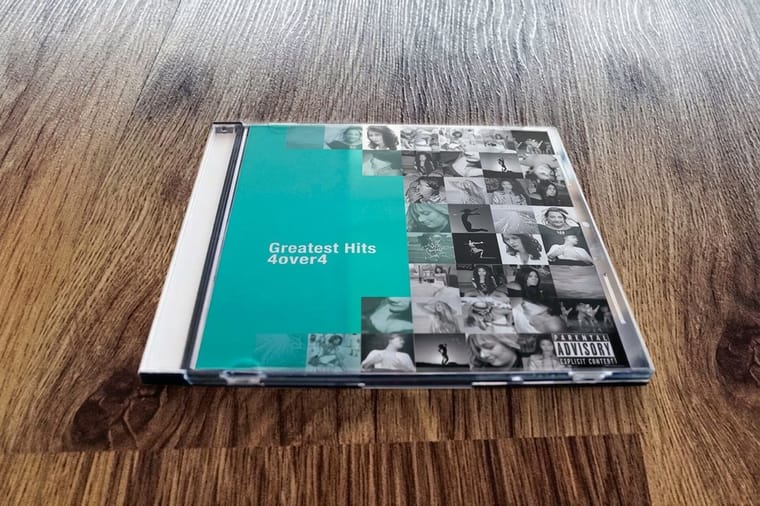
Quick answer
Five blocks, one narrow panel, and a barcode that has to scan
A CD back cover is the tray card that reads through the clear back of a jewel case, and its design problem is width. The sheet trims at 5.9375 by 4.625 inches, two 0.25 inch spines fold up at the ends, and the readable panel between them is 5.4375 inches. Fit the track list, the credits, the publisher and catalog number, the legal lines and the barcode into that, at 7 point or larger for anything a buyer scans in a shop, with the barcode in pure black on white and clear of artwork.
The Five Blocks Every CD Back Cover Has to Carry

Start from the content, not the picture. Five blocks earn their place on a tray card, and every one of them has a buyer waiting for it.
- The track list. Numbered, with running times. This is the block people scan in a shop, and it sets the type size for everything else.
- Credits. Producer, engineer, mastering, musicians, studio. Short lines, smaller than the track list, often set in a lighter weight.
- Publisher and catalog number. The catalog number repeats on the disc face and the spine, so a buyer or a distributor can match the three.
- The sound recording line and the copyright line. The first covers the recording, the second covers the artwork and the composition. Both carry a year and an owner name.
- The barcode. Lower right, on white, untouched by artwork.
Place those five as boxes before you choose a font. A typical layout puts the artist and album at the top left, the track list beneath it in one or two columns, the credits and legal lines along the bottom left, and the barcode in the bottom right corner. That arrangement survives being handled in a rack, because the eye lands top left and the barcode never fights the reading order.
The dimensions those boxes sit inside are fixed and are worth reading once before you draw anything: our guide to CD tray cards works through the trim, the scores and the fold. When you order, the back cover is one file in the set that CD covers prints, alongside the front insert. To set a jewel case beside a DVD case, our guide to cd back cover dimensions and DVD case sizes lays them side by side.
| Back of a CD cover | Measurement or option |
|---|---|
| File size | 6.1875 x 4.875 in, plus 0.125 in bleed on all four sides |
| Usable back panel | 5.4375 in wide, about 4.375 in tall inside bleed and safety |
| Spines | Two end panels of 0.25 in, scores marked on a non printing layer |
| Barcode | UPC-A at 1.469 x 1.02 in, never below 80 percent |
| Stock and finish | 100 lb gloss text, with High Gloss UV as an option |
| Runs and upload | From 25 sets, 5 business days standard; a flat CMYK PDF at 300 ppi with fonts outlined |
Laying Out a Track List Inside 5.4375 Inches

The usable panel is 5.4375 inches wide and roughly 4.375 inches tall once bleed and safety are taken out. That is a small stage, and the track count decides how you fill it.
| Element | Where it goes | Practical minimum | The mistake that costs a reprint |
|---|---|---|---|
| Track list | Upper left, one column to 12 tracks, two columns above | 7 pt dark on light, 8 pt reversed | Running times pushed into the right hand fold |
| Credits | Lower left, under the track list | 6 pt, tight but readable | Set at the same size as the tracks, so nothing leads |
| Legal lines | Bottom edge, above the safety line | 5.5 pt, one or two lines | Sitting inside the 0.125 in safety margin and getting trimmed |
| Barcode | Lower right corner of the back panel | 80 percent of 1.469 by 1.02 in | Scaled smaller or printed over an image |
| Spine text | Both 0.25 in end panels | 6 to 7 pt caps | One spine rotated the wrong way |
Set the track numbers, the titles and the times on a three column grid with the times right aligned, and let the titles truncate the gap rather than the number or the time. Long titles are the reason most track lists look broken: a 42 character song name at 7 point runs about 2.6 inches, so two columns of long titles will not fit and you are back to one column with tighter leading.
Leading matters more than point size on a piece this dense. At 7 point, 9 point leading reads and 8 point leading starts to gray out under the plastic. If you are being pushed below 6 point to make the content fit, the content is too big for the panel: move the credits into a booklet and leave the tray card with the tracks and the legal lines. Our note on the smallest font size you can print covers where legibility actually ends, and correctly sized artboards are in the blank template library.
Designing the Two Spines So the Case Reads on a Shelf

The spines are the only part of the release visible when the case is filed in a rack, so they carry the artist, the title, and usually the catalog number. Both spines get identical text, and both have to read the same way up when the case stands vertically.
Working height is the trap. A 0.25 inch spine minus a sixteenth of an inch of clearance at each side leaves about an eighth of an inch, which is roughly 9 point of vertical room. Set 6 or 7 point caps and it sits clean. Set 10 point because it looked generous at 400 percent zoom and the tray lip clips the ascenders on the finished case.
Carry the background straight through the spines and off the bleed edge. If the back panel is a dark photograph that stops at the score line, a fold that shifts by a hair shows a pale sliver down the side of the case, and folds always shift by a hair. Then check direction on a printout rather than on screen, because an upside down spine looks entirely correct in a flat layout and only reveals itself once the card is folded. Panel geometry for the whole set is in our CD cover and booklet setup guide.
Black, Reversed Type and a Barcode That Scans
Two color decisions decide whether a tray card looks sharp or muddy, and both come down to which black you use where.
Large dark areas want a rich black, a four color mix that reads deep instead of washed gray across a big panel. Small type does not. Fine text built from four inks needs four plates to land on the same spot, and a fraction of a millimeter of movement gives you a red or cyan fringe on every letter, which at 6 point turns a credits block into a blur. Set the panel in rich black, set the type in 100K black only, and the page holds together. The recipe and when to use it are in rich black explained.
Reversed type follows the same logic in reverse. White letters knocked out of a dark background lose weight as ink spreads into them, so a 6 point reversed serif with fine hairlines closes up. Go a point larger, pick a weight with even stroke thickness, and keep the reversed area away from the score lines.
The barcode is not a design element, it is a machine target. Bars are pure black on white, never rich black and never a color: scanners read with red light, so red bars on a light ground are effectively invisible to them. A UPC-A prints at 1.469 by 1.02 inches at 100 percent and is allowed between 80 and 200 percent, so 80 percent is the floor and anything smaller is a gamble at the till. Leave about 0.1 inch of clear white on each side, keep the bars vertical, and do not let artwork or a border touch that clear space. The same rules apply anywhere we print a code, as our barcode label guide sets out.
Proofing the File and Sending It to Press
Export flat. Fonts converted to outlines or fully embedded, images at 300 ppi at final size, everything converted to CMYK, and no live transparency effects sitting over the fold. Supply the file at 6.1875 by 4.875 inches with 0.125 inch bleed on all four sides, and mark the two score positions on a separate non printing layer rather than drawing them in the artwork. The general checks are in our bleed, cut line and safety checklist.
Then do the physical proof, because it is the step people skip and the one that pays. Print the file at 100 percent on plain paper, trim it to size, fold the two spines by hand, and slide it into an empty jewel case. In two minutes you will see whether the spine text reads the right way up, whether the running times survived the fold, whether the barcode has room, and whether the credits are legible under plastic at arm's length.
If the mockup tells you there is too much content, change the format rather than the type size. Standard booklets start at $240.55 and bind in multiples of four pages, so lyrics and long credits belong there. If the disc is going in a mailer or a conference bag, a case is weight you are paying to post, and CD sleeves at $438.25 take one printed face and go flat in an envelope. To settle the stock question by hand, order free paper samples, and the full set of case and sleeve options sits under CD cover printing.
Wally lays out a back cover
Two spines fold away, so design for the middle
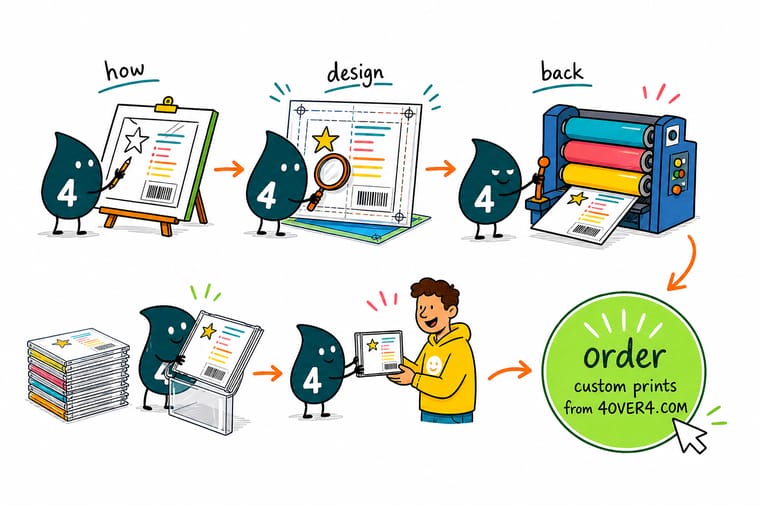
Wally draws the tray card at 5.9375 by 4.625 inches, then folds a quarter inch up at each end and watches the artist name disappear around the sides. What is left is 5.4375 inches for the track list, the credits, the catalog number, the legal lines and the barcode. He keeps the tracks at 7 point, sets the small text in plain black rather than a four color mix, and gives the barcode white space on every side. Then he prints it, folds it, and drops it in a real case before anyone sends a file.
Order CD covers →
Specs and pricing
Jewel case sets, sleeves and booklets, with starting prices
Compare the three ways a disc ships, with live configuration choices and starting prices straight from the 4OVER4.COM configurator. CD covers print on 100 lb gloss text in one to four 4.75 inch panels, CD sleeves are die cut at 5 x 5 inches on cover stock from 100 pieces, and booklets bind in multiples of four pages.



Print it
Print the set your release actually needs
CD covers from 25 sets for the jewel case, die cut sleeves from 100 for a mailer or a conference bag, and booklets when lyrics and long credits need more pages than a tray card holds.


Explore more
Where to go next
Four guides, the CD cover range and the FAQs: tray card measurements spine by spine, every panel from front to booklet, the smallest printable type, rich black, then covers, inserts and sleeves.




By the numbers
Disc packaging printed to spec at 4OVER4
Common Questions
Your CD back cover questions, answered
What size is a CD back cover?
A standard jewel case tray card trims flat at 5.9375 by 4.625 inches, about 151 by 118 mm. A 0.25 inch spine panel scores at each end and folds up around the sides of the tray, so the back panel a buyer actually reads is 5.4375 inches wide. Add 0.125 inch of bleed on all four sides, which makes the supplied file 6.1875 by 4.875 inches, and hold readable content 0.125 inch inside the trim and inside each score.
What has to go on a CD back cover?
Five blocks carry the load: the track list with running times, a credits block, the publisher and catalog number, the sound recording and copyright lines, and the barcode. Retailers and most distributors will ask for a UPC before they stock a release, and the sound recording line covers the recording while the copyright line covers the artwork and the composition. Everything else, including the label logo and a web address, is optional and should give way to the five when space runs out.
How small can the track list type go?
Seven point is a comfortable floor on a coated sheet, and 6 point is the practical limit if the type is solid dark on a light background. Reversed type, meaning light letters knocked out of a dark image, needs to be a point or two larger than the same type printed dark, because ink spread closes up the thin parts of the letters. If a 14 track list only fits at 5 point, the answer is two columns or a booklet, not smaller type.
Where does the barcode go on a CD back cover?
The lower right corner of the back panel is the convention, far enough from the spine fold that the scanner never sees a curve. A UPC-A prints at 1.469 by 1.02 inches at full size and may be scaled between 80 and 200 percent, so shrinking it below 80 percent to win space is how a release fails at the till. Leave roughly 0.1 inch of clear white to the left and right of the bars, keep the bars vertical, and never place them over a photograph.
Does the back cover print on both sides?
No. The reverse faces the plastic tray and is hidden the moment the case is assembled, so tray cards are printed one side and quoted that way. The one exception is a double case with a hinged tray, where the underside becomes visible when the tray swings open. If that is your case, say so on the order, because it turns a one side print into a two side print.
Can I use the same file for a slimline case?
No, and it is a common and expensive assumption. A slim case has no tray to hide, so it takes a single flat insert read through the clear back with no spine folds at all, and slim case dimensions vary between suppliers. Measure the empty case you are actually shipping in before you set the artboard, then rebuild the layout, because the folded spines that carry the artist name on a jewel case have nowhere to go.
How do I order a CD back cover at 4OVER4.COM?
It is ordered as part of a jewel case set under CD Covers, which starts at $75.80 and prints on 100# gloss text. Supply the tray card as its own file with the scores marked, alongside the front insert file. If the disc ships in a paper sleeve instead of a case, CD Sleeves start at $438.25 and replace the insert set entirely, and a release that needs lyrics or a credits spread wants Standard Booklets from $240.55 in page counts that are multiples of four.
Get Started
Order 25 CD covers from $75.80
Send the tray card and the front insert together, on 100# gloss text, and we print the panels that fill a jewel case.
Legal Disclaimer
Gold Standard guarantees apply to all standard orders placed through 4over4.com. Price match requires verifiable proof of a competitor's published price for an equivalent product with matching specifications and turnaround time. Satisfaction guarantee covers manufacturing defects and print quality issues. Contact support with order number and documentation.
