
Exact DVD and CD Case Dimensions With Ready-to-Print Templates


Every disc case has a fixed footprint, and your insert has to match it to the fraction of an inch. Here are the exact DVD and CD case dimensions, the bleed and safe zones to add, and how to export a cover or sleeve that fits the first time.
A standard DVD case (Amaray) is 7.5 in tall by 5.375 in wide closed, with a full wrap of about 10.75 in by 7.1875 in. A CD jewel case front insert is 4.75 in by 4.75 in, the tray card is about 5.9 in by 4.625 in, and a CD sleeve is 5 in by 5 in. Add 0.125 in of bleed on every side and keep text 0.125 in inside the trim.

Start here
DVD and CD case dimensions in one paragraph
Disc packaging fits a fixed hardware footprint, so your artwork size is not a choice, it is a spec. A full DVD case measures 7.5 in tall by 5.375 in wide when closed and takes a single wrap of roughly 10.75 in by 7.1875 in. A CD jewel case uses a 4.75 in square front insert and a tray card near 5.9 in by 4.625 in, while a simple CD sleeve is 5 in by 5 in. Build to those numbers, add 0.125 in of bleed, keep text inside a 0.125 in safe margin, and export a flattened CMYK PDF. The table below lists every measurement at a glance.
Standard DVD and CD case sizes

Before you touch a template, pin down which case you are packaging for, because the hardware sets the size. The full-size DVD case, often called an Amaray case, is the tall format you know from movie shelves: 7.5 in high by 5.375 in wide when closed, with a spine around 0.55 in (14 mm) on a standard case or 0.28 in (7 mm) on a slim case. The CD jewel case is the classic clear plastic square, 5.9 in by 4.9 in on the outside, holding a 4.75 in square booklet.
There are lighter options too. A CD sleeve or wallet is a flat 5 in by 5 in pocket with no rigid shell, which is why it is the cheapest and thinnest way to ship a disc. If you are producing packaging rather than a paper insert, our packaging sleeves and CD sleeves print to these footprints, and our CD covers cover the jewel-case inserts. Match the artwork to the exact case you will fill and the fit takes care of itself.
CD sleeve sizes and when a sleeve beats a case
A paper sleeve is a flat 5 by 5 inch pocket with no rigid shell, which makes it the thinnest and cheapest way to send a disc. It mails inside a standard envelope without the bulk or the cracking risk of a jewel case, and it costs a fraction of one per unit, so demos, press copies, software and event giveaways nearly always ship this way.
What you give up is the spine. A sleeve has no edge to print a title on, so everything a buyer needs has to live on the face, and a shelf of sleeves reads as a stack of blanks. Check the face before you lay out artwork, because a window or a thumb cut takes usable area out of the middle. Our CD sleeves and packaging sleeves print to that footprint.
Insert, spine, and wrap dimensions

Once the case is set, break the artwork into its real pieces. A DVD wrap is one continuous sheet that folds around the outside of the case: roughly 10.75 in by 7.1875 in for a standard spine, made of a 5.1875 in front panel, the spine strip, and a matching back panel. Because it is a single piece, you design it flat and let the case do the folding, keeping the spine text centered in that narrow middle strip.
A jewel case splits into two parts. The front insert or booklet cover is 4.75 in by 4.75 in. The back tray card is about 5.9 in by 4.625 in and includes two folded spine tabs on the sides where the disc titles read vertically. Keep those tab areas simple, since they sit under the plastic hinges. If you want the deeper print-side view of a DVD wrap specifically, pair this page with our DVD cover size and print specs guide, which drills into the wrap art alone.
Digipak and slim cases beyond the jewel case
Two other formats turn up often enough to catch a layout out. A digipak is a printed paperboard folder with a plastic tray or a hub glued inside, so the whole outside is one printed sheet folding into panels, and there is no separate tray card to build. The panel count sets the flat size, which means a four panel digipak and a six panel digipak need different files for the same disc.
A slim case is the thin version of the standard shell, running a 0.28 inch spine against the usual 0.55 inch, so the wrap art is narrower across the middle and the spine text has less room. Multi disc cases go the other way and widen the spine again. Measure the case you will actually fill before you build the file, since the art will not stretch to fit later.
Bleed and safe-zone setup

Disc inserts follow the exact same three-line rule as any commercial print job, and getting it wrong is the most common reason a cover looks crooked in the case. Set your document to the finished size, then add 0.125 in of bleed on every edge so any background color or photo runs past the cut. Pull a safe margin 0.125 in inside the trim and keep titles, logos, and barcodes inside it, well clear of the blade and the case hinges.
On a jewel-case tray card, give the spine tabs extra respect: the fold lines there are unforgiving, so avoid running fine text across them. If you would rather not measure any of this by hand, our free online design tool starts you on the right canvas with the guides already placed, and the general mechanics live in our bleed and trim explainer.
Choosing materials and finishes

The stock changes how a cover feels the moment someone opens the case. A heavier gloss stock makes cover photography pop and resists fingerprints, which suits film and music releases. A matte or uncoated stock reads more premium and editorial, and it takes a pen if buyers need to write on it. For sleeves that get handled a lot, a coated finish adds durability without much cost.
Think about the finish in the same pass as the size. A soft-touch or spot gloss can lift a title off a matte background, and a heavier tray card holds its shape better inside the jewel case. Order the size and stock together in the configurator, or grab the live specs further down this page to see exactly which stocks and coatings are available for CD covers and sleeves.
Exporting a print-ready file

With the layout measured, the last step is packaging it into a file the press can print without edits. Set the document to the exact case dimensions with bleed included, convert everything to CMYK so the ink prints true, place images at 300 DPI at final size, and outline or embed your fonts so the type never substitutes. Then export a flattened press-ready PDF, which is the format that prints predictably every time.
Keep the spine art and any barcode as crisp vector or high-resolution elements, because they are small and unforgiving. For the full pre-flight routine that applies to disc inserts and every other product, our commercial print-ready files guide and our file-type guide walk the whole handoff step by step.
Print CD and DVD covers at 4OVER4

Once your file matches the case, ordering is the easy part. Pick the insert or sleeve, set the size, stock, and finish, and the price updates live as you go. A run of CD covers starts around $75.80, and CD sleeves and packaging sleeves are priced for larger release runs where the per-unit cost drops as the quantity climbs.
If you are producing a full release with a disc face, a booklet, and a wrap, keep every piece on the same stock family so the set feels cohesive in hand. Use the live specs panel below to lock the exact sizes and stocks, then upload your press-ready PDF and let 4OVER4 print it to spec.
Wally measures the case before he prints the cover
Every disc insert fits a fixed footprint
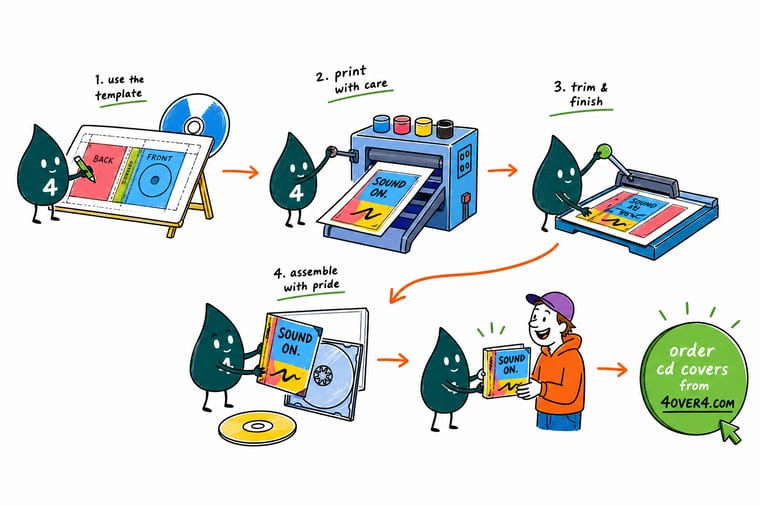
Wally treats disc packaging like a tailor treats a suit: measure the case first, then cut the art to fit. A DVD wrap is 10.75 by 7.1875 inches, a CD front insert is 4.75 inches square, and a sleeve is 5 by 5. Add bleed, keep titles inside the safe margin, export a flattened CMYK PDF, and 4OVER4 prints a cover that slides in clean the first time.
Print your CD and DVD covers →Quick reference
Every disc case measurement, at a glance
Match your artwork to the case you are filling. All sizes are the finished trim size, so add 0.125 in of bleed on every edge before you export.
| Case part | Finished size | Notes |
|---|---|---|
| DVD case (closed) | 7.5 in x 5.375 in | Standard Amaray footprint; spine 0.55 in (14 mm). |
| DVD full wrap art | 10.75 in x 7.1875 in | One continuous sheet: front, spine, and back combined. |
| Slim DVD spine | 0.28 in (7 mm) | Use a slim wrap when the case holds a single disc. |
| CD jewel case (outside) | 5.9 in x 4.9 in | The plastic shell size; the paper insert is smaller. |
| CD front insert / booklet cover | 4.75 in x 4.75 in | Square booklet cover that sits under the front lid. |
| CD tray card (back inlay) | 5.9 in x 4.625 in | Includes two folded spine tabs for vertical titles. |
| CD sleeve / wallet | 5 in x 5 in | Flat paper pocket with no rigid shell. |
| Disc face print area | 4.72 in diameter | Center hole 0.59 in; keep art off the clamp ring. |
Step by step
Set up a disc cover in 6 steps
- Confirm the exact case first Decide between a full DVD case, a slim case, a jewel case, or a sleeve, since each one has its own footprint. The hardware sets your artwork size, not the other way around.
- Start the document at the finished trim size Create the file at the case dimensions from the table above, whether that is a 4.75 in square insert or a 10.75 in DVD wrap.
- Add 0.125 in bleed and a 0.125 in safe margin Extend backgrounds past every edge and pull titles, logos, and barcodes inward so nothing is lost at the cut or the case hinges.
- Place the spine and tray tabs carefully Center spine text in its narrow strip and keep fine detail off the folded tabs on a jewel-case tray card.
- Work in CMYK at 300 DPI Convert color to CMYK and confirm every image is sharp at 100 percent zoom at final size before you go further.
- Export a flattened press-ready PDF Outline or embed fonts, include bleed, and export a single PDF, then upload it in the configurator for your covers or sleeves.
Specs and pricing
CD cover specs and live pricing
Once your insert is sized, the print choices come down to stock and finish. Here are the live specs and price-per-unit for CD covers at 4OVER4.COM, straight from the configurator.

| Quantity | Price Per Unit | Total |
|---|---|---|
| 25 | $3.03 | $75.80 |
| 50 | $1.67 | $83.48 |
| 100 | 91.2¢ | $91.18 |
| 150 | 65.9¢ | $98.86 |
| 200 | 53.3¢ | $106.55 |
| 250 | 45.7¢ | $114.24 |
| 300 | 41.7¢ | $125.22 |
| 400 | 34.0¢ | $136.20 |
Print it
Print your disc packaging at 4OVER4

Explore more
Where to go next





By the numbers
Stocks a disc sleeve or cover can print on
Common Questions
Common questions about DVD and CD case dimensions
What is the size of a CD sleeve?
A standard CD sleeve is 5 by 5 inches flat, sized so the disc drops in with a little clearance on every side. That is the finished size, so build the artwork at 5 by 5 inches and add 0.125 inches of bleed on each edge before you export. If the sleeve has a window or a thumb cut, subtract that area from what you can print on and keep type clear of it.
What is the sleeve of a CD?
A sleeve is the flat paper or card pocket a disc slides into, with no rigid plastic shell around it. It is the simplest disc packaging there is, which is why it is the cheapest and thinnest option and the one used for demos, press copies, software and giveaways. A jewel case is the alternative, a hinged clear shell holding a booklet and a tray card, which costs more and takes far more room.
What is the size of a standard CD?
The disc itself is 120 millimetres across, about 4.72 inches, and 1.2 millimetres thick, and it is the same on every standard CD and DVD. That is why case and insert sizes barely vary between releases. The printable label area on the disc stops short of the clear inner ring around the hole, so keep artwork off that ring or it will not reproduce.
What are standard DVD case dimensions?
A standard DVD case, the Amaray format used for most retail movies, is 7.5 inches tall by 5.375 inches wide when closed, with a spine around 0.55 inches (14 mm). The wrap artwork that folds around it is one continuous sheet of roughly 10.75 inches by 7.1875 inches, combining the front panel, the spine strip, and the back panel. A slim DVD case uses a thinner 0.28 inch (7 mm) spine for a single disc. Always add 0.125 inches of bleed on every edge before you export.
How do I choose the right disc case for my project?
Match the case to the disc and the budget. A full DVD case suits films and multi-disc sets and gives you a tall spine for shelf titling. A CD jewel case is the classic square shell for music and software, holding a 4.75 inch square booklet and a tray card. A CD sleeve or wallet is the thinnest, cheapest option, a flat 5 by 5 inch paper pocket with no rigid shell, ideal for mailers and giveaways. Decide the case first, because it fixes your artwork size.
What does printing CD and DVD covers cost and how are prices set?
Price scales with a few levers: quantity, size, paper stock, and finish. More pieces lower the unit price, and a heavier stock or a special coating adds to it. CD covers at 4OVER4 start around $75.80, while sleeves and packaging sleeves are priced for larger release runs. You set each option in the configurator and the total updates live as you adjust it, so you can see exactly what a bigger run or a gloss finish does to the number before you commit.
What sizes, stocks, and finishes are available for disc packaging?
You can print full DVD wraps, slim DVD wraps, jewel-case front inserts at 4.75 inches square, tray cards near 5.9 by 4.625 inches, and flat 5 by 5 inch sleeves. Stocks range from glossy coated papers that make cover photography pop to matte and uncoated options that read more premium and take a pen. Finishes like spot gloss or soft-touch can lift a title off the background. The live specs panel on this page lists the exact sizes, stocks, and coatings currently available.
How long does it take to print and ship disc covers?
Turnaround depends on the product, the quantity, and the finish you choose, and the configurator shows the available production and shipping options for your exact order before checkout. Because 4OVER4 prints in-house in Queens, New York, most standard jobs move quickly, and you can compare shipping speeds at the time of order. To avoid delays, upload a correctly sized, flattened CMYK PDF with bleed included so the file needs no fixes before it goes to press.
Get Started
Ready to print a cover that fits the case perfectly?
Bring your correctly sized, press-ready PDF to 4OVER4.COM and print CD covers, sleeves, or DVD wraps on the stock and finish your release calls for. Adjust every option and watch your price update live.
Legal Disclaimer
Gold Standard guarantees apply to all standard orders placed through 4over4.com. Price match requires verifiable proof of a competitor's published price for an equivalent product with matching specifications and turnaround time. Satisfaction guarantee covers manufacturing defects and print quality issues. Contact support with order number and documentation. On-time delivery rate based on tracked orders 1999 to 2026. Individual results may vary based on shipping carrier performance.
