
How to Print QR Code Stickers That Scan Every Time


Jordan is our labels, packaging and sustainability voice, built from the knowledge of our production team, with over 20 years in printing.
Generating the code is the easy part. Size, margin, ink and material are what decide whether the printed sticker actually reads, and all four are set before the file leaves your desk.
Print QR code stickers at 100% black on a white, opaque material, at least 1 inch wide for a handheld scan, with four modules of blank margin on every side. Then scan the finished sticker on the surface it will live on, under the light it will live under, before you approve the full run. A dynamic code lets you change the destination later. A static one locks the printed batch to one URL forever. Make the code in our free QR code generator and download it as vector before you set up the sticker.
Quick answer
Size it, margin it, print it black, then scan the real thing
A QR code needs to be roughly a tenth as wide as the distance it is scanned from, with four modules of clear space on all four sides. Print it in single-channel black on white vinyl for anything outdoors or wet, on paper for short indoor runs, and keep it off clear stock unless there is white ink behind it. Matte lamination beats gloss under overhead light. The last step is not optional: apply a production sticker to the real surface and scan it with two different phones before the run is approved.
Generate a Code That Survives Being Printed
Most QR stickers that fail were already broken in the generator, before anyone opened a print file. Four decisions at that stage set everything that follows.
Static or dynamic. A static code carries the destination inside the pattern itself. Change the URL and every sticker you printed is scrap. A dynamic code encodes a short redirect that you re-point later, and it reports scan counts as a bonus. Print static only when the destination is genuinely permanent, like a home page.
Keep the URL short. The more characters you encode, the more modules the code needs, and the smaller each module gets at a fixed sticker size. A short link at version 3 is 29 modules across. A long tracking URL with five parameters can push the same code past version 8 and 49 modules, which at 1 inch square means each module drops to 0.02 inch. Same sticker, half the tolerance.
Set error correction to Q or H if a logo is going in the middle. The four levels recover roughly 7, 15, 25 and 30 percent of a damaged code. Higher correction adds modules, so it is a trade: you buy damage tolerance and pay in density. For a plain code on a clean sticker, level M is plenty and keeps the modules large.
Export vector, in 100% K. An SVG or EPS scales to any sticker without softening. A black built from all four inks can shift a fraction of a millimeter on press and blur every module boundary, so specify single-channel black. The complete QR code guide covers how the pattern is assembled if you want the mechanics behind the versions.
Size the Code for the Distance It Gets Read From
Sizing a QR sticker is not a design judgement, it is arithmetic. The code has to be about a tenth as wide as the distance the phone will be held at, and the blank margin around it is part of the code rather than white space you can trim.
| Code width | Comfortable read distance | Typical placement | Sticker size to order |
|---|---|---|---|
| 1 in | About 10 in, arm's length | Jars, table tents, business card stickers, product tops | 1.5 in square or round |
| 2 in | About 20 in | Shipping cartons, door decals, equipment panels | 2.5 to 3 in |
| 4 in | About 40 in | Shop windows read from the doorway, shelf edges | 5 in |
| 12 in | About 10 ft | Storefront glass, van panels, warehouse racking | 14 in, printed on vinyl |
The fourth column is where most orders go wrong. The QR spec requires four modules of clear space on all four sides, so a 1 inch code at version 3 needs about 0.14 inch of blank margin, and your die line then has to sit outside that. Squeeze a border, a tagline, or the cut edge into the margin and scanners start hunting for the code instead of reading it.
Two more habits pay off. Do not scale the code non-uniformly in a layout app, because a code stretched even slightly stops being square modules. And leave the light modules as unprinted stock rather than printing a white on white, which keeps the contrast at its maximum. Our sticker size guide lists the sizes we run most, and every one of them has a matching layout in the blank template library.
For the QR code sticker size itself, the catalog sizes line up with the table. Standard stickers run from 0.375 by 1 inch upward and include 1.5 by 1.5 and 2 by 2 inch squares for a 1 inch code. Vinyl stickers come in 2.75, 3.25, 4 and 5 inch squares, or any size you enter for a 12 inch window code. Die-cut stickers run from 2 by 2 up to 11 by 11 inches.
Material and Finish Decide Whether It Scans At All

A QR code is a contrast device. Anything that lowers the difference between the dark modules and the light background costs you scans, and material choice moves that difference more than anything you do in the file.
| Material | How it treats a QR code | Where it belongs | Starts at |
|---|---|---|---|
| Vinyl | White base, waterproof, holds crisp edges outdoors for years. | Equipment, vehicles, windows, anything wet or sunlit. | $25 |
| Paper | Excellent contrast dry, but cockles and distorts once wet. | Indoor events, packaging inserts, short-run promos. | $23.88 |
| Clear | Takes the surface color underneath as its background. | Light, flat surfaces only, or with white ink behind the code. | $25 |
| Die-cut | Any outline, so the quiet zone has to be planned into the shape. | Branded shapes where the code sits inside a defined panel. | $93.37 |
| Roll | Identical codes, applied fast by hand or by machine. | Production lines and fulfilment, thousands of the same code. | $322.98 |
Finish matters almost as much. Gloss lamination looks better in a photograph and scans worse under a ceiling light, because the specular highlight sits right across the modules and the camera sees a white stripe. Matte lamination scatters that light and is the safer specification for anything read indoors under downlights or outdoors in direct sun.
Curvature is the last trap. A code wrapped around a 2 inch jar bends the modules away from the lens, and past roughly a third of the circumference the distortion beats the decoder. Keep the code on the flattest panel available, or drop the code size so it sits within a gentle arc. The outdoor sticker material guide goes deeper on adhesives and weathering, and vinyl versus paper covers the cost difference honestly.
On the order form, the choices that matter for a code are few. Standard stickers start at $23.88 for 25 and $42.72 for 100, on uncoated, semi gloss, hi gloss, white vinyl or clear label, with a 1/0 black ink only option that prints the code as single channel black. Vinyl stickers start at $25 for 25 on white vinyl permanent or repositionable. Both run a three business day standard turnaround, and die-cut stickers five. Upload the code as an SVG, EPS or PDF at finished size in 100% K.
Set Up the File, Then Test the Real Print
File setup for a QR sticker is ordinary sticker setup with one extra rule: the quiet zone is untouchable. Build the artwork at finished size, add the bleed the product asks for, and then check that nothing, including the die line, enters the four module margin.
The order of operations that avoids reprints:
- Place the code at final size. Generate it at the dimension you need instead of scaling a smaller file up in the layout.
- Lock the aspect ratio. A code stretched 2 percent horizontally still looks fine and decodes worse.
- Check the die line clearance. On a die-cut sticker the cut follows your shape, so the quiet zone has to be drawn into the shape, not assumed.
- Proof on paper first. Print the artwork on an office printer at exactly 100 percent and scan it. This catches sizing mistakes for the price of one sheet.
- Then test the production sticker. Apply it to the actual surface, at the actual angle, under the lighting it will live under, and scan with both an iPhone camera and an Android camera.
That last step is the one people skip, and it is the only one that tests the finished object. Lamination, curvature, and the surface underneath all change the result, and none of them exists on your monitor. Scan it after lamination, not before.
If the code is going on packaging that ships in volume, order roll stickers so the same code applies quickly and consistently. If it is going on a poster, a menu, or a mailer instead of a sticker, the setup rules are identical and adding a QR code to postcards walks through that version. Everything we print on adhesive stock sits in sticker printing, with live pricing per size and quantity.
Wally explains QR stickers
The blank margin is part of the code
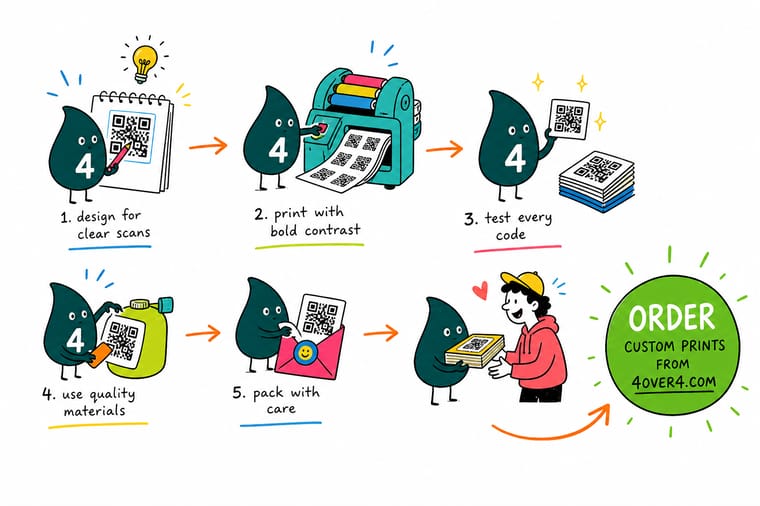
Wally keeps four blank modules around every code, prints it in solid black on white vinyl, and makes it about a tenth as wide as the distance it gets scanned from. Then he sticks one on the actual jar, in the actual light, and scans it with two phones before the run goes ahead. Clear stock is the one he avoids: whatever the sticker sits on becomes the background, and a dark bottle eats the contrast the scanner needs.
Order vinyl stickers →
Specs and pricing
Sticker materials, sizes, and starting prices
Configure the three stocks a QR code lives on most, with live sizes, quantities and starting prices straight from the 4OVER4.COM configurator: vinyl stickers from $25 for 25, standard stickers from $23.88 for 25, and die-cut stickers from $93.37 for 25, in 3, 3 and 5 business days.

Vinyl, die-cut or roll
Order stickers a phone can read
White vinyl for anything wet or sunlit, a die-cut shape with the quiet zone drawn into the outline, or roll stickers from $322.98 when the same code goes on thousands of packages.

QR versions, outdoor materials and sizes
Where to go next



Printed in our Queens plant
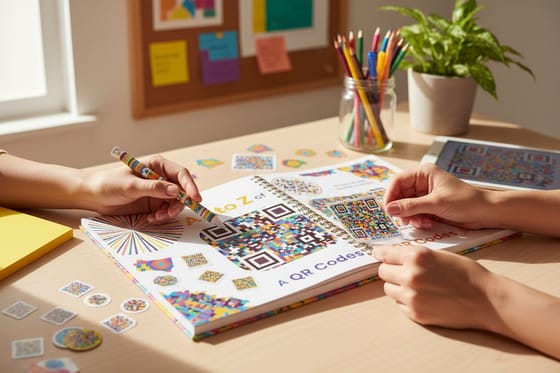
Codes printed black on white with the margin kept
Common Questions
Your QR sticker questions, answered
What size should a QR code sticker be?
Start from the distance it gets scanned from and divide by ten. A code read at arm's length, which is about 10 inches, needs roughly 1 inch of code. A box label read at two feet wants 2 inches. A window sticker read from the sidewalk at ten feet wants 12 inches. We do not recommend going below 1 inch square on a sticker, because the sticker also needs its quiet zone and its bleed, so a 1 inch code lands on a sticker closer to 1.5 inches overall.
Can you print a QR code on clear stickers?
You can, and it fails more often than any other choice. A transparent sticker hands the background to whatever surface it is applied to, so a code that decoded perfectly on the proof stops decoding on a dark bottle or a stainless steel panel. If the clear look matters, ask for a white ink flood behind the code area only, which keeps the rest of the sticker transparent. Otherwise print white vinyl stickers and save the trouble.
Do QR code stickers work outdoors and in the rain?
On vinyl, yes. Vinyl stickers are waterproof, take UV exposure for a few years, and survive being wiped down, which is why they go on equipment, windows, and delivery vehicles. Paper stickers are for indoor and short-term use: one rainstorm cockles the paper, the modules distort, and the scan gets unreliable. If the sticker will ever be wet, cold, or in direct sun, specify vinyl and matte lamination.
Can a QR code sticker have a logo in the middle?
Yes, within limits. QR encoding carries redundancy at four levels, from about 7 percent recoverable at level L to about 30 percent at level H. Generate at level H and a small centered logo sits inside the redundancy the code can afford to lose. Two rules hold: keep the logo well under the recoverable area, and never let it touch the three corner finder patterns, because those are how a scanner locates and orients the code in the first place.
Can I change where a printed QR sticker points?
Only if you printed a dynamic code. A static QR has the destination baked into the pattern, so changing the link means reprinting. A dynamic QR encodes a short redirect URL that you re-point whenever you want, and it counts scans as a side effect. For anything with a print run measured in thousands, or any campaign URL that might move, print the dynamic version. The one thing to check is that whoever hosts the redirect will still be there in three years.
What file format and resolution should the QR code be?
Supply vector if you can. An SVG, EPS, or PDF QR scales to any sticker size with perfectly hard module edges. If you only have a raster file, generate it fresh at the finished size at 300 dpi or higher and never enlarge an existing PNG, because the soft gray edge it produces confuses the decoder at small sizes. Color should be 100% K only, with the light modules left as unprinted stock rather than a printed white.
Get Started
Order 25 QR stickers from $23.88
Pick your size, choose white vinyl for outdoors or paper for indoor runs, and we print stickers with edges sharp enough for a phone to lock onto.
Legal Disclaimer
Gold Standard guarantees apply to all standard orders placed through 4over4.com. Price match requires verifiable proof of a competitor's published price for an equivalent product with matching specifications and turnaround time. Satisfaction guarantee covers manufacturing defects and print quality issues. Contact support with order number and documentation.
