
How To Organize A Work Notebook Or Journal


Emma is our prepress and print production voice, built from the knowledge of our production team, with over 20 years in printing.
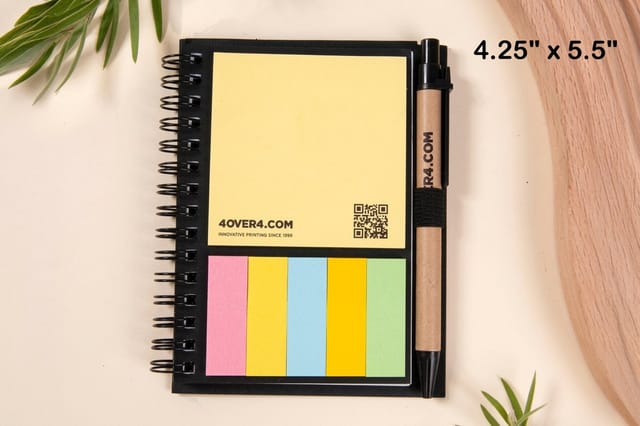
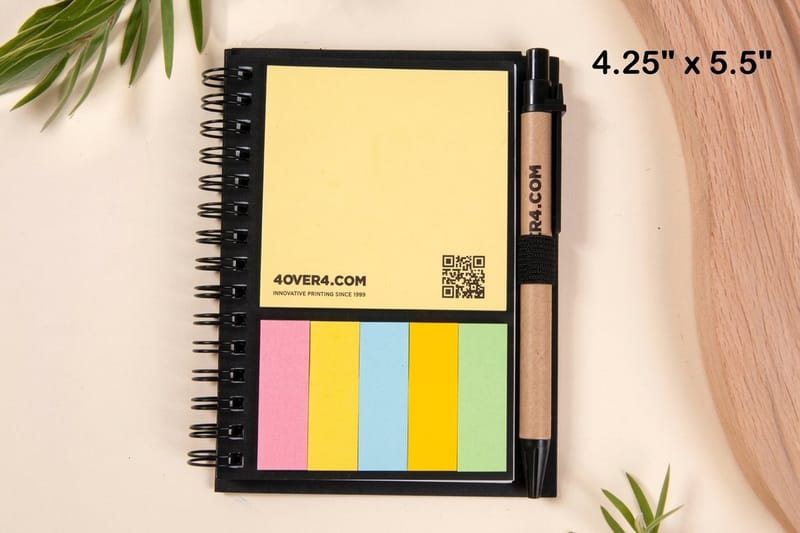
Turn a pile of scattered notes into a tool you trust. This is a simple seven-step system for organizing a work notebook or journal, from choosing a layout to building an index, plus how to print a notebook built to last. It also shows which book fits which system before you order: a deluxe spiral notebook in 4.25 by 5.5 or 5 by 7 inches for the daily driver, embossed notebooks for the reference book that stays on the desk, and 3D lenticular notebooks when the cover should stand out.
To organize a work notebook, give it one clear purpose, pick a single layout, number every page, and keep a running index on the first pages. Add a short daily list and a weekly review, use two or three consistent colors as signals, and choose a durable notebook that lies flat. The system matters more than the stationery: a simple structure you actually maintain beats a beautiful one you abandon.

Start here
The whole system in one paragraph
Organizing a work notebook comes down to one purpose, one layout, numbered pages, and a running index. Decide what the book is for, pick a structure and stick to it, number every page so notes have addresses, and reserve the first pages for an index you update as you go. Add a daily list, a weekly review, and a few consistent color signals, then carry a notebook durable enough to keep up. The steps below walk through each part, and the infographic sums the whole system up at a glance.
Watch it printed
See deluxe spiral notebook on the press, in 67 seconds
Why an organized notebook beats a stack of apps
Most people do not have a notebook problem. They have a retrieval problem. Notes go in fine. It is finding the right one three weeks later that falls apart. A meeting action item, a phone number, a rough sketch of an idea, and a lunch order all land on the same page, in the same handwriting, with no way back in.
An organized work notebook fixes that by giving every note a home and a way to be found again. You do not need a fancy planner or a new app for it. You need a simple, repeatable system and a notebook sturdy enough to survive daily use, like a deluxe spiral notebook that lies flat and takes ink on both sides.
This guide is a seven-step system: decide what the book is for, pick a layout, number the pages, build an index, run a daily and weekly rhythm, add signals like color and tabs, and finish with the few accessories that remove friction. Setting it up costs about ten minutes on day one, most of it spent numbering pages.
Step 1: Decide what your notebook is actually for
How do I organize a work notebook? Give the book one job, number every page, reserve the first two or three pages for an index, then write one dated entry per day front to back and add a single index line the moment you start something new. Mark each line with one symbol, a box for a task, a circle for a meeting, a dot for an idea, and keep a block of back pages for reference that never moves. The seven steps below make each of those parts concrete.
Before you rule a single line, get clear on the job. A notebook that tracks daily work tasks is laid out very differently from a journal for long-form thinking, and a project logbook is different again. Trying to make one book do all three without a plan is how you end up with the mess in the first place.
Pick a primary purpose and be honest about it. Common ones: a daily driver for tasks and meeting notes, a project log for a single client or build, a bullet-style journal that mixes planning and reflection, or a reference book you rarely rewrite. If you genuinely need more than one, use more than one book rather than cramming them together.
Your purpose also decides the paper you want. Heavy sketching and diagrams call for thicker stock and a binding that opens flat. Quick daily notes are happy on lighter paper. A marker or a fountain pen will ghost through thin sheets, so if you draw as much as you write, test before you buy the year. If you are not sure how a stock feels in the hand before you commit, order free paper samples and test a pen on them first.
Step 2: Choose one organization system and commit to it
There is no single correct layout, only the one you will keep up. The three that hold up best for work are chronological, sectioned, and hybrid. Chronological means you write front to back by date and rely on an index to find things. Sectioned means you carve the book into fixed zones for tasks, meetings, and ideas. Hybrid runs chronologically day to day but reserves the back pages for standing reference.
For most working professionals the hybrid approach wins, because meetings and tasks are naturally date-driven while reference notes are not. Whatever you choose, write the rules on the inside cover so future-you does not have to guess. Consistency is what makes any system work, the same way a shared set of design templates keeps a brand consistent across every printed piece.
If you would rather start from a proven structure than invent one, our online designer lets you lay out and print a custom cover and interior, so your notebook opens with your own dashboard, key, and index already in place.
Bullet journal versus sectioned notebook versus index method
Most people stall on step 2 because these three get sold as philosophies instead of workflows. Here is what each one costs you before you write the first line, and exactly where each one breaks, so you can choose in two minutes and get back to work.
| System | Setup before you write | Best for | Weak point | How it fails in practice |
|---|---|---|---|---|
| Bullet journal | Ten minutes numbering pages, plus one page for the key and one for the month log | Weeks where tasks carry over, and work that mixes planning with reflection | Migration is manual, every open task gets rewritten by hand | You miss three days, the pile of unmigrated tasks feels like homework, and the book gets abandoned instead of caught up |
| Sectioned notebook | Ten minutes numbering, plus deciding the page budget for tasks, meetings and ideas while the book is still empty | Roles with fixed buckets, for example a standing meeting load and a running idea list | You have to guess how many pages each zone needs before you know your own volume | The meetings zone runs out mid-year, notes spill into the ideas zone, and the tabs stop telling the truth |
| Index method, chronological plus index | Ten minutes numbering, plus two or three pages reserved at the front | Anyone who writes front to back and does not want layout rules to follow | Nothing is grouped on the page, everything is found by lookup | You skip the index for a week, the entries lose their addresses, and you are back to flipping through the whole book |
Is a bullet journal good for work notes? Yes, when your week genuinely has tasks that roll forward, because the migration step forces you to re-read your own list and drop what died. If most of what you write is meeting notes and reference material that never moves, migration is dead work and the index method will serve you better for less effort. The hybrid most professionals settle on borrows from both: the bullet journal key, the index method spine of dated pages front to back with one index at the front, and a reserved block of back pages for standing reference that should never be migrated at all.
Whichever you pick, write the choice and the key on the inside cover on day one. Switching systems in month four is what kills a notebook, far more often than picking the wrong one in month one.
Step 3: Number every page before you write a word
Page numbers are the small habit that makes everything else possible. Without them an index is useless, because there is nothing to point to. Spend ten minutes numbering the bottom corner of every page when the notebook is new, or print one that comes pre-numbered so the work is done for you.
Numbering also changes how you use the book. Once pages have addresses you can leave a topic, jump forward, and come back later, linking related notes across the book by their numbers the way footnotes link a document. A spiral binding helps here too, since you can flip and fold pages back flat without fighting the spine.
If you are printing a custom notebook, add the page numbers to the template so every copy ships ready to index. A durable spiral notebook survives a year of daily flipping without pages tearing loose.
Step 4: Build an index you will actually keep updating
Reserve the first two or three pages for an index, sometimes called a table of contents or key. Every time you start a meaningful entry, add one line to the index: a short label and the page number. That is the entire trick, and it is the difference between a searchable notebook and a shoebox of receipts.
Keep index entries short and scannable, and group them if it helps, with one column for projects, one for meetings, and one for ideas. Some people also keep a running list of open action items on a dedicated page and check it every morning. Treat that page like a launch checklist. The same discipline that keeps a project on track is what a salon launch suite uses to stop opening-day details from slipping.
The index only works if updating it is frictionless, so keep a pen clipped to the book and make the entry the moment you turn to a fresh page, not later.
Step 5: Run a daily and weekly rhythm
A system you only touch when you remember is not a system. Give your notebook two standing appointments. Each morning, open to a fresh page, date it, and write the two or three things that have to happen today. Each Friday, skim the week's pages, move anything unfinished forward, and update the index for anything worth finding again.
This weekly review is where the notebook earns its keep. It catches dropped tasks, surfaces patterns, and turns scattered notes into a record you can actually mine later. Photographers, founders, and freelancers who keep a steady log tend to build a body of proof over time, the way one photographer turned a project log into client-winning prints.
Keep both appointments at the same time every week: the list first thing in the morning, the review on Friday. You trust the book because you tend it on schedule, and one missed review is easy to catch up where three in a row are not.
Step 6: Add color, tabs, and symbols as signals
Once the structure is solid, a light layer of color makes it faster to scan. The key word is light. Two or three colors used consistently, one for tasks, one for meetings, one for ideas, read instantly. A rainbow reads as noise. Assign each color a meaning, note it in your key, and never break the rule.
Symbols do the same job in black ink. A box for a task, a circle for an event, a dash for a note, an arrow for something moved forward: a tiny, consistent vocabulary lets you triage a page at a glance. Add stick-on tabs to the edges of your most-used sections so you can open straight to them without hunting.
Printed pieces use the same trick: a brochure with two accent colors and one set of icons reads faster than one with six. For more on turning simple rules into clean, scannable layouts, browse our full library of printing and design guides.
Six small tricks that make any system faster
Each of these saves seconds a day, which is what keeps a habit alive.
- Cut the corner. Snip the bottom corner off each page as you finish it, and the book falls open at the first uncut page every time.
- Date the cover. Write the start date on the front the day you open the book and the end date the day you close it, so a shelf of old volumes reads like a calendar.
- Inside front cover for standing facts. Your key, the project codes, the numbers you dial weekly. Nothing that changes.
- To do list at the back. Run the master task list from the last page forward, so daily notes and the list never collide.
- Leave a blank page after each meeting. Follow ups land next to the notes they came from instead of ten pages later.
- Rewrite once a month. Copy the open items and the facts still in use onto one fresh page and cross the rest out.
None of these need a new notebook. They need ten seconds and a pen that is already clipped to the book.
Step 7: Get the few accessories that actually help

You do not need a drawer of gadgets, just a handful of things that remove friction. A reliable pen that will not smear or bleed through, a couple of stick-on tab dividers, a small ruler if you draw a lot of tables, and an elastic band or clip to keep the book closed in a bag. That covers most desks.
The one upgrade worth making is to the desk setup around the notebook. A tidy station where your phone charges while you write keeps you off the screen and in the book. A compact 3-in-1 wireless charger clears the cable clutter that tends to bury a notebook under everything else. The wireless charger video walks through it before you add one to an order.
Buy little. If a tool does not get you opening the book more often, leave it on the shelf.
When the notebook fills up, starting volume two
A full notebook is the moment most systems die, because the index, the key and the standing reference all live in the old book. Do the handover in one sitting. Number the new volume on its cover, volume 2, with the date range of volume 1 written under it, and copy three things forward: the key from the inside cover, the open items from the back page list, and any reference you looked up more than twice. Everything else stays in the old book, where the index still finds it.
Then add one line to the new index, volume 1 index on page 1 of the old book, so a search that starts in the current volume knows where to go next. Keep the last two volumes on the desk and the rest on a shelf with the dates facing out. If a team shares the system, order the volumes in batches so every book has the same page count, which a ready-made deluxe spiral notebook from $5 makes cheap to do.
How to choose the right notebook (and what printing one costs)

The best system in the world still needs a book that can carry it. Three things matter most: binding, paper, and size. A spiral binding lies completely flat and folds back on itself, which is why it suits daily work better than a tight perfect-bound spine. Paper weight decides whether ink shows through, and size is a trade-off between writing room and portability. In our range, the ready-made deluxe spiral notebook comes in 4.25 by 5.5 or 5 by 7 inches and ships in 1 business day, and the 3D lenticular notebook runs from 4.25 by 5.5 up to 8.5 by 11 inches with 50 blank uncoated sheets and Wire-O binding, from 50 copies.
Printing your own notebook is more affordable than most people expect, and the price works on a few simple levers: quantity, size, paper stock, and cover finish. More copies lower the unit price, so a small team can each carry the same book. A deluxe spiral notebook at 4OVER4.COM starts at $5, and you watch the per-unit price update live as you change the options.
Before you commit, compare the formats side by side in our custom work notebooks range. The deluxe spiral notebook is the one to pick for a daily driver, because you can fold it back one-handed on a desk corner or in a meeting. Embossed notebooks carry the logo pressed into the cover and are the better call for the reference book that stays on the desk all year or gets handed to a client. Match the binding to the job rather than to the look: spiral for the book you flip fifty times a day, embossed hardcover for the one you keep. The deluxe spiral notebook and embossed notebooks each have a short story you can flip through first.
If you want something that stands out on the desk, we also print 3D lenticular notebooks with covers that shift as they move. Our explainer on the way lenticular printing works covers how that effect is made. Whichever you pick, use the specs and pricing panel below to lock in the exact stock and size before you order.
Wally explains the notebook system
A tidy notebook is just a few small habits, kept up

Wally treats a work notebook like a filing cabinet you can carry: number the pages so every note has an address, keep an index on the first pages, and add one line whenever you start something new. Do that, back it with a quick daily list and a Friday review, and the book stays searchable for a year. Then print it on a spiral binding that lies flat and takes ink on both sides, and the system has a body tough enough to keep up.
Design and print a notebook →
Infographic
The work notebook system at a glance
One frame, seven habits. Save it, share it, and use it as a checklist the next time you set up a fresh notebook or journal.
The seven habits reinforce each other. Purpose and one system set the structure, numbered pages and an index make it searchable, and a steady rhythm with light color signals keeps it running all year.
Specs and pricing
Deluxe spiral notebook specs and live pricing
When you are ready to order, the decision comes down to size. Here are the live specs and price-per-unit for the ready-made deluxe spiral notebook at 4OVER4.COM, straight from the configurator.
| Quantity | Price Per Unit | Total |
|---|---|---|
| 1 | $5.00 | $5.00 |
| 2 | $5.00 | $10.00 |
| 3 | $5.00 | $15.00 |
| 4 | $5.00 | $20.00 |
| 5 | $5.00 | $25.00 |
| 6 | $5.00 | $30.00 |
| 7 | $5.00 | $35.00 |
| 8 | $5.00 | $40.00 |
Kit it out
Print the notebook and the tools around it



Explore more
Where to go next





By the numbers
Paper types for a notebook that gets daily use
Common Questions
Common questions about organizing a work notebook
How do I organize my notes at work?
Give every note an address and a symbol. Number the pages, write one dated entry per day front to back, and mark each line with a box for a task, a circle for a meeting and a dot for an idea. Add one index line the moment a note starts something new. Each morning list the three things that must happen, and each Friday move the unfinished ones forward and update the index. That is the whole method, and it works in any notebook.
How do I fill my empty notebook?
Set it up before you write a word. Number every page in the bottom corner, leave the first two or three pages blank for the index, write the key on the inside front cover, and reserve the last few pages for a running to do list and standing reference. Then start on page 4 with today's date and whatever is in front of you. The first entries are always messy, and that is fine, because the index is what makes them findable, not the neatness.
What is the best way to organize a work notebook?
Start by giving the notebook one clear purpose, then pick a single layout and keep it consistent. Number every page, reserve the first few pages for an index, and add one index line whenever you begin a new entry. Back that with a short daily task list and a weekly review, and use two or three colors as consistent signals. The specific method matters less than maintaining it: a simple system you keep up always beats a complex one you drop.
How do I set up an index in a notebook?
Number your pages first, then leave the first two or three pages blank for the index. Each time you start a meaningful entry, write a short label and its page number on an index line. Keep the labels brief and, if it helps, group them into columns like projects, meetings, and ideas. The habit only sticks if it is frictionless, so keep a pen with the book and make the entry the moment you turn to a new page.
Should I use one notebook or several?
Use one notebook if a single purpose covers most of what you write, and split into several only when the jobs are genuinely different, for example a daily task book and a separate long-term project log. Cramming unrelated content into one book is the main reason notebooks become hard to search. When you do split, give each book a clear label and its own index so you always know which one holds what.
What kind of notebook is best for work?
For daily work, a spiral-bound notebook is hard to beat because it lies completely flat and folds back on itself, so it stays open on a crowded desk. Choose a paper weight heavy enough that ink does not show through if you write on both sides, and a size that balances writing room against carrying it around. At 4OVER4.COM the ready-made deluxe spiral notebook comes in 4.25 by 5.5 or 5 by 7 inches, with 50 ruled pages.
What does it cost to print a custom notebook, and how is the price set?
Custom notebook pricing scales with a few simple levers: quantity, size, paper stock, and cover finish. More copies lower the per-unit price, so ordering for a whole team costs far less each than a single book. A deluxe spiral notebook at 4OVER4.COM starts at $5, and the configurator updates the price live as you change each option.
What sizes, stocks, and finishes are available for notebooks?
Notebooks come in a range of sizes from pocket to full letter, on paper stocks from lighter everyday weight to heavier premium sheets, with cover finishes from matte to gloss and specialty options. Each choice changes how the book writes and how it holds up. Use the specs and pricing panel on this page to see the exact combinations, or order free paper samples first so you can feel the stock before you commit. On this page, the deluxe spiral notebook comes in 4.25 by 5.5 or 5 by 7 inches, and the 3D lenticular notebook runs from 4.25 by 5.5 to 8.5 by 11 inches with 50 blank uncoated sheets.
How long does a custom notebook take to print and ship?
Turnaround depends on the product, quantity, and finish you choose, and the estimated production and shipping time is shown in the configurator as you build your order. For the current lead time on a specific notebook, set your options on its product page and the estimate updates with your selections. As a guide, the deluxe spiral notebook ships in 1 business day and the 3D lenticular notebook takes 22 business days.
Get Started
Ready to give your system a notebook that keeps up?
Bring your layout to 4OVER4.COM and print it on the size, stock, and cover finish that suits how you work. Adjust every option and watch your price update live.
Legal Disclaimer
Gold Standard guarantees apply to all standard orders placed through 4over4.com. Price match requires verifiable proof of a competitor's published price for an equivalent product with matching specifications and turnaround time. Satisfaction guarantee covers manufacturing defects and print quality issues. Contact support with order number and documentation.
