


- Home
- content hub
- 12 Best Professional Presentation Template Sources for 2025
12 Best Professional Presentation Template Sources for 2025
Emma Davis
Content Writer
Jul 30, 20253449 views

In the world of business, a powerful message deserves an equally powerful delivery. A generic, text-heavy slideshow can undermine even the most groundbreaking ideas, causing your audience to disengage before you’ve made your point. This is where a high-quality professional presentation template becomes your most valuable asset, transforming complex data and compelling narratives into visually engaging experiences that resonate. It's not just about aesthetics; it's about building a framework for clarity, impact, and professional credibility. A well-designed template provides a structured, polished foundation that allows your core content to shine, ensuring your audience remains captivated from the first slide to the last.
This comprehensive guide is designed to help you bypass endless searching and find the perfect platform for your specific needs. We will navigate you through the top 12 resources for acquiring a world-class professional presentation template, from comprehensive design marketplaces like Envato to AI-powered innovators like Beautiful.ai. For each resource, we’ll provide a direct link, a clear visual example, and an honest analysis of its unique strengths and ideal use cases. You'll gain practical insights to select the right tool, whether you're creating a sales pitch, a corporate training module, or a keynote address, and make your next presentation truly unforgettable.
1. Brochures Templates
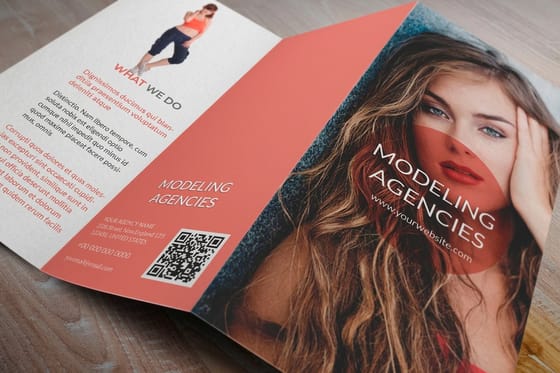
4OVER4's Brochure Templates stand out as a premier resource for businesses seeking a professional presentation template that extends beyond the screen. While often associated with digital slideshows, a tangible, professionally printed brochure serves as a powerful physical asset in meetings, trade shows, and client pitches. This platform excels by merging high-caliber design with the practicalities of professional printing, offering an extensive library of templates that are both visually impressive and strategically crafted for business communication.
The true strength of this platform lies in its deep integration of design and production. Users can select a template and immediately begin customizing it within 4OVER4’s intuitive online designer, a tool that simplifies the process without requiring advanced graphic design skills. This seamless workflow allows for rapid personalization of text, imagery, and branding elements, ensuring the final product aligns perfectly with your company's identity.

Why It's a Top Choice
What elevates 4OVER4 is its foundation in over two decades of printing expertise. Unlike purely digital template sites, every design is optimized for a premium print finish. This ensures that the colors, layout, and paper quality of your brochure will produce a polished, high-impact marketing tool. This focus on the final printed piece makes it an invaluable resource for creating materials that leave a lasting impression.
- Best For: Marketing teams, sales professionals, and small businesses needing high-quality physical leave-behinds for presentations and events.
- Standout Feature: The combination of a user-friendly online designer with guaranteed professional-grade printing transforms a great digital design into an exceptional physical brochure.
- Practical Tip: Use the instant pricing tool as you design to manage your budget effectively. Experiment with different paper stocks and finishes to see how they impact cost and the final look.
For a cohesive presentation package, consider pairing your brochures with professionally designed folders. Explore options for full-color presentation folders on 4over4.com.
| Feature Analysis | Assessment |
|---|---|
| Customization | Extensive options within the online designer, though highly specialized graphic needs may require external software. |
| Ease of Use | The interface is user-friendly, but new users may need a short period to familiarize themselves with all the tools. |
| Quality | Backed by 20+ years of printing experience, ensuring top-tier print results and material quality. |
| Pricing | Competitive, with transparent instant pricing and eco-friendly options available. |
| Turnaround | Excellent, with same-day shipping available for most orders, ideal for tight deadlines. |
2. Envato Elements
Envato Elements is a powerhouse resource for creatives, offering a comprehensive subscription service that goes far beyond just presentation templates. Its primary differentiator is the "all-you-can-eat" model. For a single monthly or annual fee, users gain unlimited access to a colossal library of over 100,000 professional presentation template designs for PowerPoint, Keynote, and Google Slides. This makes it an incredibly cost-effective solution for agencies, marketing teams, and freelancers who constantly need fresh, high-quality design assets.

The platform isn't just about quantity; the quality is consistently high, with templates submitted by a global community of professional designers. The true value lies in the bundled assets. A subscription also includes stock photos, vector graphics, fonts, and even video templates, allowing you to create a cohesive and polished presentation without sourcing materials from multiple sites.
Key Details & User Experience
Navigating Envato Elements is straightforward. The search and filtering system is robust, letting you narrow down options by application (PowerPoint, etc.), style, and color. The user interface is clean, prioritizing asset discovery.
- Access Model: Subscription-based only. No individual template purchases are available.
- Unique Offering: The unlimited download model covers all creative assets, not just presentations.
- Best For: High-volume users like marketing agencies, corporate creative departments, and design freelancers.
- Pro Tip: Use the "Collections" feature to save and organize your favorite templates and supplementary assets for specific projects, streamlining your workflow significantly.
Website: https://elements.envato.com
3. SlideModel
SlideModel carves out a specific niche by focusing exclusively on high-quality, 100% editable presentation templates for business professionals. With a library of over 40,000 designs, it’s a dedicated resource for creating data-driven and visually compelling corporate presentations. Its main strength lies in providing complex, pre-built assets like business diagrams, data charts, and editable maps that save immense time. The platform is designed for users who need to communicate complex information clearly without deep design skills.

Unlike all-in-one creative platforms, SlideModel’s laser focus on presentations ensures every template is optimized for business contexts. The templates are fully compatible with PowerPoint, Google Slides, Keynote, and OpenOffice, offering great flexibility. A unique feature is the personal concierge service, which provides users with assistance in finding or adapting templates, a valuable touch for those on a tight deadline. Once your digital design is finalized, you can complement it with professional presentation materials for a polished final product.
Key Details & User Experience
The user experience on SlideModel is exceptionally straightforward, with a clean interface that makes finding the right professional presentation template quick and easy. The search function is robust, allowing filtering by category, tags, and compatibility.
- Access Model: Subscription-based. Plans vary by download limits, from a 3-month basic plan to an annual unlimited plan.
- Unique Offering: The library is rich with specialized business diagrams, editable maps, and data visualization tools.
- Best For: Business consultants, project managers, and corporate teams who frequently create data-heavy or strategic presentations.
- Pro Tip: Take advantage of the 100% editable nature of the shapes and icons. You can deconstruct complex diagrams and reuse individual components across different presentations to maintain brand consistency.
Website: https://www.slidemodel.com
4. Canva
Canva has fundamentally democratized design, and its approach to presentations is no exception. It stands out as a supremely accessible, web-based platform that empowers users with little to no design experience to create a stunning professional presentation template. Its core strength is its intuitive drag-and-drop editor, which simplifies the entire design process, from selecting a layout to customizing fonts and colors. Canva offers thousands of templates across countless industries and styles, making it a go-to for quick turnarounds and collaborative projects.

The platform integrates a massive library of stock photos, icons, charts, and fonts directly into the editor. This seamless integration means you can build a visually rich presentation without ever leaving the Canva ecosystem. Its real-time collaboration features are also a major draw for teams, allowing multiple users to edit and comment on a presentation simultaneously, streamlining feedback and ensuring brand consistency across the final product.
Key Details & User Experience
The user experience is Canva's crown jewel; the interface is clean, self-explanatory, and highly responsive. Finding and customizing a template is a friction-free process.
- Access Model: Freemium. A generous free plan offers substantial functionality, while the Pro subscription unlocks premium templates, an expanded asset library, and advanced tools.
- Unique Offering: The all-in-one, browser-based editor with built-in asset libraries and powerful real-time collaboration.
- Best For: Individuals, small businesses, students, and marketing teams needing a fast, easy-to-use solution for creating visually appealing presentations without a steep learning curve.
- Pro Tip: Use the "Brand Kit" feature (available in Pro) to preload your company's logos, color palettes, and fonts. This allows you to apply your branding to any template with a single click, saving immense time.
Website: https://www.canva.com
5. Slidesgo
Slidesgo has carved out a niche by offering a vast and visually vibrant collection of both free and premium templates, making professional design highly accessible. Its strength lies in its thematic diversity and a strong focus on fun, illustrative styles that stand out from typical corporate designs. The platform is incredibly user-friendly, offering direct compatibility with Google Slides and PowerPoint, which simplifies the editing process for users of all skill levels. This focus on accessibility makes it a go-to resource for educators, students, and businesses looking for a creative, high-quality professional presentation template without a significant investment.

Unlike many platforms that require registration just to browse, Slidesgo allows instant downloads for its free offerings. The templates are known for including useful infographics, icons, and other editable visual aids, providing a comprehensive toolkit within a single download. While a premium subscription unlocks the full library and removes the attribution requirement, the free selection is robust enough for many projects.
Key Details & User Experience
Navigating Slidesgo is a breeze, with templates neatly categorized by style (e.g., minimalist, futuristic, cute) and topic (e.g., business, education, medical). The search function is effective, and each template page provides a clear preview of all included slide layouts.
- Access Model: Freemium. A large collection is free with attribution, while a premium subscription unlocks all assets and removes attribution requirements.
- Unique Offering: A massive library of creative, often illustrated, templates that are completely free to use.
- Best For: Educators, students, non-profits, and startups needing visually engaging presentations on a tight budget.
- Pro Tip: Pay close attention to the final slides in each template download; they often contain a full library of extra icons and graphic elements you can copy and paste throughout your presentation for a custom feel.
Website: https://slidesgo.com
6. GraphicRiver
A sibling site to Envato Elements, GraphicRiver operates on an entirely different model that caters to a different type of user. Instead of a subscription, it functions as a classic marketplace where you can purchase a professional presentation template individually. This pay-per-item approach is ideal for those who need a single, high-impact design for a specific project without committing to a recurring fee. The platform features thousands of unique templates for PowerPoint, Keynote, and Google Slides, all submitted by independent creators from around the world.

This model provides immense flexibility and affordability for one-off needs. While you won't get the bundled extras like stock photos or fonts that come with a subscription service, the quality of the core presentation files is consistently high. The direct purchase system ensures you own the license for that specific template, making it a straightforward choice for project-based work. The platform’s vast selection ensures that you can find a design that perfectly complements your brand's aesthetic, much like choosing the right design for custom business cards.
Key Details & User Experience
The user interface is very search-centric, allowing you to filter by application, price, and even sales volume to find popular and proven designs. Finding what you need is quick, and the checkout process is simple.
- Access Model: Pay-per-item. You purchase and download individual templates as needed.
- Unique Offering: A la carte purchasing from a massive, diverse marketplace of designers.
- Best For: Individuals and small businesses with infrequent needs or those on a tight, project-specific budget.
- Pro Tip: Pay close attention to the "Included Files" section on a template's product page to see exactly what you get, as some creators include helpful documentation or bonus icons.
Website: https://graphicriver.net
7. SlideBazaar
SlideBazaar specializes in providing a rich collection of professional presentation template designs, with a strong focus on data visualization elements like infographics, charts, and diagrams. It caters primarily to business, academic, and professional users who need to convey complex information clearly and effectively. The platform distinguishes itself by offering highly specific and functional templates, such as SWOT analysis, customer journey maps, and timeline infographics, saving users significant design time.

While many platforms offer general-purpose templates, SlideBazaar's strength lies in its library of purpose-built graphical assets compatible with PowerPoint and Google Slides. Their regularly updated catalog ensures that the designs remain modern and relevant for various business scenarios. This focused approach makes it a go-to resource for managers, analysts, and educators who need to build compelling, data-driven narratives without starting from scratch. For those managing physical marketing campaigns alongside digital ones, exploring custom printing options like door hangers can complement a comprehensive strategy.
Key Details & User Experience
Navigating SlideBazaar is straightforward due to its clean interface and well-organized categories. Users can easily find specific diagrams or templates through a simple search or by browsing categories like "Business," "Strategy," or "Charts."
- Access Model: Offers both individual template purchases and affordable subscription plans for unlimited access.
- Unique Offering: A deep library of specialized business diagrams, charts, and infographic templates.
- Best For: Business professionals, educators, and students who frequently need to visualize data and processes.
- Pro Tip: Before committing to a subscription, browse their extensive categories to see if their specialized diagrams align with your most common presentation needs.
Website: https://slidebazaar.com
8. PresenterMedia
PresenterMedia carves out a unique niche by specializing in animated and interactive PowerPoint templates. If your goal is to break away from static, traditional slides, this platform is a treasure trove of dynamic content. Its core strength lies in providing designs that capture audience attention through movement, including 3D graphics, animated characters, and video backgrounds. This makes it an excellent choice for educators, trainers, and marketers looking to create a more memorable and engaging professional presentation template that truly stands out.

While some designs may feel too elaborate for highly conservative corporate settings, the vast majority offer a creative yet professional edge. The platform’s value is enhanced by its extensive library of supplementary assets, including animated clipart and customizable video elements, allowing you to build a cohesive and visually dynamic narrative from start to finish. The regular addition of new content ensures that the selection remains fresh and relevant.
Key Details & User Experience
The PresenterMedia website is straightforward, with clear categories for templates, animations, and videos. The customization tools are integrated directly into PowerPoint via an add-in, which simplifies the workflow for users familiar with that environment.
- Access Model: Subscription-based only. No individual template purchases are available.
- Unique Offering: A strong focus on animated templates, 3D graphics, and interactive elements.
- Best For: Educators, corporate trainers, and sales professionals who need to create highly engaging and dynamic presentations.
- Pro Tip: Use the PresenterMedia add-in for PowerPoint to directly search and insert animations and graphics without leaving your presentation, saving significant time.
Website: https://www.presentermedia.com
9. SlideGenius
SlideGenius operates in a different league, functioning as a full-service presentation design agency rather than a template marketplace. This platform is for organizations that require a completely bespoke, high-stakes presentation crafted by professional designers. Instead of downloading a pre-made professional presentation template, clients work directly with the SlideGenius team to build a presentation from the ground up, tailored to their specific brand, message, and audience. This service is ideal for major corporate keynotes, investor pitches, and critical sales meetings where an off-the-shelf solution won't suffice.

The agency’s core strength is its expertise in visual storytelling and data visualization. They transform complex information and rough concepts into polished, compelling narratives. While they don't offer templates, their portfolio serves as a powerful source of inspiration, showcasing what's possible with high-end custom design. The process is consultative, ensuring the final PowerPoint or other format deliverable is perfectly aligned with strategic goals.
Key Details & User Experience
Engaging with SlideGenius is a project-based experience. You initiate contact through their website, followed by a consultation to define the scope, messaging, and design direction. It is a premium, hands-off service for the client.
- Access Model: Custom design service on a per-project basis. Pricing is quote-based.
- Unique Offering: A fully outsourced design process, resulting in a one-of-a-kind presentation.
- Best For: Corporations, executives, and marketing teams needing a flawless, high-impact presentation for a critical event.
- Pro Tip: Before engaging, prepare a detailed creative brief. Clearly outline your objectives, target audience, key messages, and any brand guidelines to ensure the design team can execute your vision efficiently.
Website: https://www.slidegenius.com
10. Creative Market
Creative Market operates as a bustling online marketplace for design assets, functioning as a hub for independent creators to sell their work directly to users. Its strength lies in its vast and diverse collection of unique presentation templates. Instead of a uniform corporate style, you'll find a professional presentation template for every niche, from minimalist and artistic to bold and corporate. The platform's model is built on one-time purchases, making it ideal for users who need a specific design for a single project without committing to a recurring subscription.

This direct-from-creator approach results in a treasure trove of distinctive designs that you won't find on larger, more standardized platforms. Many templates come bundled with extras like custom icons, fonts, and even stock photos, providing significant value in a single purchase. Because you're buying from individual designers, the aesthetic variety is immense, offering a more handcrafted and less generic feel than many mass-market alternatives.
Key Details & User Experience
Navigating Creative Market is similar to browsing an e-commerce site, with robust search filters for application, style, and price. Since quality can vary between individual sellers, it's crucial to read user reviews and check the seller's ratings before purchasing.
- Access Model: One-time purchase per template. No subscription is required.
- Unique Offering: A highly diverse, creator-driven marketplace with unique and often niche designs.
- Best For: Individuals and businesses seeking a unique, one-off template with a specific aesthetic.
- Pro Tip: Pay close attention to the "What's Included" section on each product page. Many designers bundle valuable fonts and graphics, but file compatibility and included assets can differ significantly.
Website: https://creativemarket.com
11. SlideTeam
SlideTeam stands out due to the sheer scale of its library, positioning itself as one of the largest repositories for presentation assets on the web. Boasting a collection of over one million slides, it offers an exceptionally deep and diverse range of professional presentation template options. The platform specializes in highly specific business needs, providing everything from industry-focused pitch decks and marketing plans to complex data-driven diagrams and infographic templates. This makes it an invaluable resource for professionals looking for a nearly turnkey solution for a specific report or presentation.
The platform's strength lies in its meticulous categorization. Users can easily find templates tailored for functions like finance, HR, or project management, as well as for industries like healthcare or real estate. This granularity saves significant time. A well-designed presentation can also be a powerful leave-behind; explore high-quality booklet and catalog printing to complement your digital slides with a physical asset.
Key Details & User Experience
Navigating SlideTeam is a search-driven experience. The interface is functional, designed to help users quickly drill down into its massive library to find the exact slide or template they need.
- Access Model: Freemium. A selection of templates is available for free, but full access requires a subscription plan.
- Unique Offering: The library's immense size and highly specific, niche-focused template categories.
- Best For: Business professionals, consultants, and academics who need specialized, data-centric, or industry-specific presentation content.
- Pro Tip: Use the search bar with very specific keywords like "supply chain process flow" or "5-year financial projection" to leverage the platform's extensive and well-tagged library effectively.
Website: https://www.slideteam.net
12. Beautiful.ai
Beautiful.ai positions itself as the anti-PowerPoint, focusing on "smart slides" that automatically adapt to your content. Its primary differentiator is an AI-powered design engine that enforces good design principles. As you add text or images, the layout reconfigures itself to maintain a professional, clean aesthetic. This unique approach makes it incredibly appealing to non-designers or professionals who need to create a stunning professional presentation template without spending hours tweaking alignments and font sizes.

The platform offers a library of pre-built templates and a vast collection of free photos and icons to populate your slides. While it automates the design, it still allows for team collaboration, making it a viable tool for small teams working on pitches or reports. The trade-off for this simplicity is a reduction in granular control; you are working within the "rules" of the platform's design AI.
Key Details & User Experience
The user interface is minimalist and guided, focusing on content input rather than design tools. The experience is about speed and consistency.
- Access Model: Subscription-based. A limited free plan is available, but core features require a Pro or Team subscription.
- Unique Offering: The AI-driven design assistant that automatically formats slides for a polished look.
- Best For: Individuals and teams without design expertise who need to produce beautiful presentations quickly and consistently.
- Pro Tip: Trust the AI. Instead of fighting the automated layouts, focus on choosing the right "smart slide" template for your data and let the platform handle the visual arrangement.
Website: https://www.beautiful.ai
Top 12 Presentation Template Resources Comparison
| Item | Core Features / Characteristics | User Experience / Quality ★ | Value Proposition 💰 | Target Audience 👥 | Unique Selling Points ✨ |
|---|---|---|---|---|---|
| Brochures Templates (4OVER4) | Customizable brochure templates, fast printing | ★★★★☆ High-quality print, easy online design | 💰 Competitive pricing + eco-friendly | 👥 Businesses needing polished marketing collateral | 🏆 20+ yrs print expertise, same-day shipping |
| Envato Elements | Unlimited downloads, vast asset library | ★★★★☆ Professional, regularly updated | 💰 Subscription cost-effective | 👥 Frequent template users | ✨ Includes fonts, graphics, stock photos |
| SlideModel | 40k+ editable PPT templates, multi-software support | ★★★★☆ Professional + concierge service | 💰 Subscription-based | 👥 Business professionals | ✨ Personal concierge, wide template variety |
| Canva | Drag & drop, thousands of free/premium templates | ★★★☆☆ Beginner-friendly, versatile | 💰 Free tier + paid upgrades | 👥 Beginners to pros | ✨ Collaboration & extensive design elements |
| Slidesgo | Free & premium PPT/Google Slides templates | ★★★☆☆ Easy navigation, infographics included | 💰 Free + subscription for premium | 👥 Students, educators, professionals | ✨ No registration for free templates |
| GraphicRiver | Individual template purchases, no subscription | ★★★★☆ Unique, affordable designs | 💰 Pay-per-template | 👥 Casual buyers preferring no subs | ✨ One-time purchase, global designer network |
| SlideBazaar | Infographics, charts, affordable subscriptions | ★★★☆☆ Professional, user-friendly | 💰 Affordable subscription options | 👥 Business & education users | ✨ Regularly updated, easy website |
| PresenterMedia | Animated & interactive templates | ★★★★☆ Dynamic, engaging designs | 💰 Subscription required | 👥 Creative & dynamic presenters | ✨ Animated & 3D graphics |
| SlideGenius | Custom presentation design services | ★★★★★ High-quality, tailored output | 💰 Premium custom pricing | 👥 Corporates, high-profile clients | 🏆 Visual storytelling expertise |
| Creative Market | One-time purchase templates & assets | ★★★☆☆ Unique designs, varied quality | 💰 Affordable individual purchases | 👥 Designers & small businesses | ✨ Marketplace with varied creator styles |
| SlideTeam | 1M+ slides, free & premium templates | ★★★★☆ Extensive, regularly updated | 💰 Subscription + free options | 👥 Corporates & professionals | ✨ Industry/function categorized templates |
| Beautiful.ai | AI-powered design, auto-adjusting layouts | ★★★★☆ Simplifies design for non-designers | 💰 Subscription required | 👥 Non-designers & teams | ✨ AI-driven smart layouts |
Choosing the Right Template for Maximum Impact
Navigating the vast landscape of presentation resources can feel overwhelming, but as we've explored, the key is to move beyond a simple search for an aesthetically pleasing design. The most effective approach involves a strategic selection process, where the final choice of a professional presentation template is perfectly aligned with your specific communication goals, audience expectations, and brand identity. This guide has dissected a dozen leading platforms, from the expansive, all-you-can-download libraries like Envato Elements and SlideModel to the AI-powered design assistants like Beautiful.ai, each offering a unique value proposition.
Your decision hinges on a clear understanding of your own priorities. Are you a data analyst needing to translate complex figures into clear, digestible charts? A platform like SlideBazaar, with its focus on business diagrams, might be your ideal partner. Are you a startup founder pitching to investors, where a polished, modern, and memorable narrative is paramount? Resources from Creative Market or SlideGenius can provide that unique, high-impact edge. The journey to a powerful presentation begins with this self-assessment.
Synthesizing Your Options: A Strategic Recap
To distill the information presented, consider these core decision-making factors when selecting your next professional presentation template:
- Brand Cohesion vs. Creative Variety: For established businesses, maintaining brand consistency across all touchpoints, both digital and physical, is non-negotiable. A solution that integrates with print materials is crucial. Conversely, creative agencies and freelancers might prioritize a vast, ever-growing library that fuels diverse client projects, making subscription services like Envato Elements or Slidesgo more attractive.
- Ease of Use vs. Customization Power: Platforms like Canva and Slidesgo are celebrated for their intuitive interfaces, allowing users with minimal design experience to create professional-looking slides in minutes. However, power users, such as graphic designers, may require the deep customization capabilities found in templates from GraphicRiver or SlideTeam, which offer granular control over every element within PowerPoint or Keynote.
- Specific Use Case vs. General Purpose: Don't just look for a "business" template. Get specific. If your presentation is for an academic conference, a financial report, a product launch, or a team training session, seek out platforms that specialize in or offer robust categories for that exact need. PresenterMedia, for example, excels with its animated elements, perfect for creating engaging educational content.
From Template to Triumph: Final Considerations
Ultimately, the best professional presentation template is not merely a background; it is a communication tool that empowers you. It should reduce your design workload, allowing you to focus on what truly matters: refining your message and connecting with your audience. As you implement your chosen template, remember to ruthlessly edit its content. A template provides the structure, but your clear, concise, and compelling narrative brings it to life. Use the features, such as master slides and pre-designed layouts, to maintain consistency, but never be afraid to adapt or remove elements that don't serve your core message.
By investing the time to select the right resource, you are investing in your own credibility and the impact of your ideas. A well-chosen and thoughtfully customized template transforms your presentation from a mere series of slides into a persuasive, memorable, and professional experience that achieves its objectives and leaves a lasting positive impression.
Ready to ensure your digital presentations and physical marketing materials speak the same language? 4OVER4 offers a comprehensive suite of professionally designed brochure templates and other print products that align perfectly with your presentation's aesthetic. Visit 4OVER4 today to create a cohesive brand experience that impresses your audience from the screen to the printed page.
More from professional presentation template
10
When you hear "table tent specs," what we're really talking about are the foundational details for printing them correctly: the
Emma Davis
Jan 27, 2026
61
When you're ready to print a poster, one of the first questions you'll face is, "What size should it be?" The industry has a
Emma Davis
Jan 26, 2026
88
Picture this: you're at a networking event, and someone hands you their business card. You do the usual glance—name, title, company—an
Emma Davis
Jan 25, 2026
104
Believe it or not, figuring out how to make a card in Word is surprisingly easy. You can knock out everything from slick, professional busines
Emma Davis
Jan 24, 2026
104
Printing on packaging takes a simple container and turns it into one of your most powerful marketing tools. It’s the very first physical int
Emma Davis
Jan 23, 2026
326
When you're getting ready to print a flyer, one of the first questions you'll face is, "What size should it be?" The most co
Emma Davis
Jan 22, 2026
332
How Our Free Business Cards Program Works (Quick Overview) Free business cards are available through two different
Emma Davis
Jan 22, 2026
179
A QR code business card does more than just share your name and number; it cleverly merges your physical card with your digit
Emma Davis
Jan 21, 2026


