Table of Contents
- Home
- content hub
- A Guide to Brochure Printing Online
 Share and earn
A Guide to Brochure Printing Online

Jun 25, 2025835 views
Jun 25, 2025835 views
When you need to get the word out, brochure printing online offers a fantastic blend of cost-effectiveness, speed, and deep customization. It’s a smart move for any business, big or small. You can take a design living on your desktop and, with just a few clicks, turn it into a high-quality, tangible marketing tool. This isn't just about convenience; it's about taking control of your marketing budget and schedule.
Why Online Brochure Printing Makes Sense

In a world overflowing with digital pings and ads that disappear in a blink, a physical brochure has a unique power. It cuts right through the noise. It gives your customers a real, physical connection to your brand—something they can hold onto, read whenever they like, and come back to later. That physical presence often leads to much deeper engagement and sticks in their memory far better than a fleeting digital ad.
The beauty of online printing platforms is that they've leveled the playing field. A small startup or a local nonprofit can now create marketing materials with the same polished, professional finish as a huge corporation, all without needing a massive budget or an in-house design team.
The Strategic Advantages of Printing Online
Going with an online printer is more than just a simple file upload. It's a strategic move that brings some serious perks to your marketing game. The whole system is built for efficiency, from getting an instant price quote to streamlining the entire ordering process. You get to skip all the back-and-forth phone calls and emails that often bog down traditional print jobs.
Here’s what you stand to gain:
- Cost Efficiency: Online printers operate on a large scale, which means they can offer really competitive prices on both small and large orders. You can order the exact number you need, which helps cut down on waste and storage headaches.
- Unmatched Customization: You get to be the director of your project. You have total control over every little detail, from the paper stock and its weight to the folding style and any special finishes. This freedom lets you craft a brochure that’s a perfect match for your brand and your campaign’s specific goals.
- Speed and Convenience: The whole process works around your schedule. You can get a quote, tweak your order, and give the final approval whenever it works for you. And with super-fast turnaround options, you can have those brochures printed and on their way in days, not weeks.
When every marketing dollar has to pull its weight, you need tools that deliver maximum impact without breaking the bank. Online brochure printing does exactly that, giving you a high-return-on-investment way to connect directly with your customers.
The Enduring Power of Print
Even with digital media everywhere, printed materials have a staying power that's hard to ignore. Research consistently shows that people pay more attention to physical media and often find it more trustworthy. Brochures printed online are a key piece of a well-rounded marketing strategy, working hand-in-hand with your digital efforts. They make great leave-behinds after a meeting, invaluable handouts at trade shows, and effective mailers for direct marketing. You can explore a whole world of marketing materials to see how print can elevate your strategy.
The numbers back this up. Printed materials can hold a reader's attention 118% longer than digital ads and generate 29% higher brand recall. What’s more, physical mail like brochures sees open rates between 57.5% and 85%, which blows the average email open rate of just 0.6% out of the water. It’s clear that a well-designed brochure isn’t some old-fashioned tactic—it’s a powerful, proven tool for making an impression that lasts.
Bringing Your Brochure Design to Life
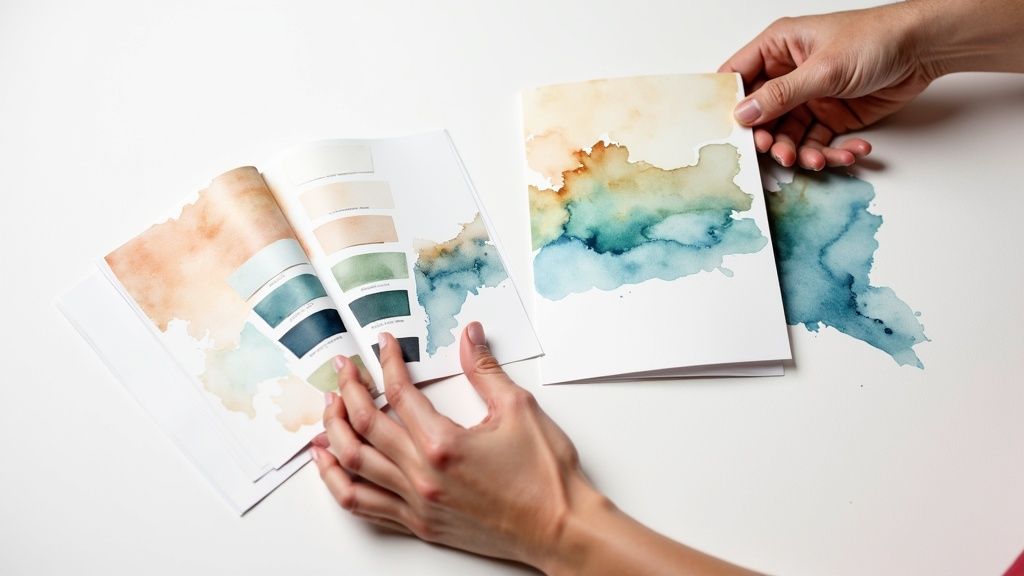
This is the fun part—where your ideas start taking shape and become a real marketing tool you can hold in your hand. When it comes to brochure printing online, you have two main starting points: picking a pre-designed template or uploading a file you’ve built from scratch. There's no right or wrong answer here. The best choice really comes down to your budget, how fast you need it, and your brand's specific needs.
Think of a template as getting a running start. It's a fantastic option if you need something professional-looking on a tight deadline, especially if you don't have a designer on your team. You get a layout that’s already proven to work; all you have to do is drop in your own words, logo, and photos.
On the flip side, uploading your own design gives you total creative freedom. This is the way to go for brands with very specific style guides or those who want to create a brochure that’s completely unique. For example, a luxury real estate firm might upload a custom bifold with special finishes, while a new coffee shop could use a simple trifold template for their grand opening to get the word out quickly and affordably.
Making Your Design Work in Print
Whether you’re working with a template or starting fresh, a few design rules are non-negotiable for print. Your main job is to guide the reader’s eye through the content. We do this with visual hierarchy—making the most important stuff, like your headline or a special offer, pop off the page.
Here are a few things I always double-check before sending a file to print:
- Color Mode: Always, always design in CMYK (Cyan, Magenta, Yellow, Key/Black). This is the color standard for physical printing. If you design in RGB, which is meant for screens, you’re in for a surprise when your brochures arrive—and not a good one. The colors will look dull and off.
- Image Resolution: Your images need to be high-resolution. The gold standard is 300 DPI (dots per inch) at the final printed size. A photo that looks perfectly sharp on your website will turn into a blurry, pixelated mess in print if the resolution is too low.
- White Space: Don't be afraid of empty space. White space (or negative space) isn't wasted space; it gives your design elements room to breathe. It makes the entire brochure feel less cluttered, more professional, and way easier to read.
A great brochure does more than just list facts; it tells a compelling story. The journey from the front cover to the inside panels should feel so natural and engaging that the reader can't help but see what's next.
Matching the Format to the Function
The type of brochure you choose should match what you’re trying to accomplish. A compact trifold is a lifesaver at trade shows because it's easy to hand out and fits neatly into a bag, presenting information in quick, digestible sections.
But if you’re creating a detailed product mailer, you’ll need more room to tell your story. A larger bifold or even a multi-page booklet gives you the space for in-depth specs, compelling images, and more persuasive copy.
Ready to get started? Exploring powerful tools like image personalization software can help you create visuals that connect with each customer on a personal level. And if you really want to stand out from the pile, think beyond standard rectangles. Our guide on custom die-cutting options shows how a unique shape can make your brochure practically unforgettable.
Selecting Specs for a Professional Finish
Once you've nailed down the design, it's time to think about how your brochure will actually feel in someone's hands. This is where you bring your on-screen creation to life, choosing the specs that give it that tangible, professional quality. When you're handling brochure printing online, these decisions are what separate a decent handout from a piece that truly reflects your brand's standards.
The whole tactile experience of a brochure starts and ends with the paper. The finish you choose—whether it's glossy, matte, or something else—isn't just a minor detail; it sends a clear message.
Choosing the Right Paper Stock and Weight
Think of paper as the very foundation of your brochure. A heavier stock feels more substantial and premium, while the finish dictates how your colors and text will look and feel.
For instance, a glossy finish has that classic shiny, reflective surface that makes colors leap off the page. It's an absolute workhorse for photo-heavy designs. If you're a travel agency showcasing vibrant destinations or a real estate agent with stunning property photos, glossy is your best friend.
A matte finish, on the other hand, gives you a more understated, elegant look with almost no glare. This makes it perfect for brochures with a lot of text, like those for financial advisors or law firms, since it’s much easier to read under bright office lights. Then there's uncoated stock, which has a natural, almost raw texture. It’s a great fit for eco-conscious brands or any business going for an artisanal, handcrafted vibe.
To help you visualize the best fit, here’s a quick breakdown of common paper finishes.
Choosing the Right Paper Finish for Your Brochure
This table compares common paper finishes to help you decide which is best for your brochure's design and purpose.
| Paper Finish | Best For | Look and Feel | Pro Tip |
|---|---|---|---|
| Glossy | Photo-heavy designs, vibrant colors, marketing flyers. | Shiny, reflective, smooth. Colors appear very saturated. | Excellent for grabbing attention, but can be prone to fingerprints and glare. |
| Matte | Text-heavy content, corporate or professional services. | Smooth, non-reflective, elegant. | Hides fingerprints well and offers a sophisticated, modern feel. |
| Uncoated | Eco-friendly brands, rustic or artisanal aesthetics, writable surfaces. | Natural, slightly textured, organic feel. | Great for designs that use negative space and want a tactile quality. |
Ultimately, the right finish ties directly back to your brand identity and the message you want to convey before a single word is even read.
Paper weight, measured in pounds (lb), is all about communicating durability and value. A lighter 80lb text is a popular and budget-friendly option, especially for mass mailings or trade show handouts. But if you want to make an impression, upgrading to a sturdier 100lb cover stock gives your brochure a substantial, premium feel that screams quality.
Finding the Perfect Fold
How a brochure unfolds is a huge part of the user experience. Each fold type creates a different "reveal," guiding your reader through the information in a deliberate sequence. The key is to match the fold to your content flow and how the brochure will be used.
- Trifold: The classic. This fold gives you six panels (three per side), which is ideal for breaking information into smaller, easy-to-digest chunks. It’s the go-to for welcome packets, general service menus, and trade show tables.
- Bifold: A simple fold right down the middle, creating four panels. This format is fantastic when you have large, impactful images or want to present a more straightforward message, like for a high-end product reveal or a restaurant menu.
- Z-Fold: This accordion-style fold is perfect for designs that flow across panels or for showing a step-by-step process. The way it opens is a little different, which can make your brochure more memorable and engaging.
Want to add a little something extra? For a truly standout piece, you can explore other finishes. If you're aiming for a touch of luxury, consider adding a brilliant shine to your logo or key text with our specialty metallic foil printing services.
The goal is to create a seamless experience. The fold should complement the design, not fight against it, leading the reader on an intuitive journey from the front cover to your final call to action.
The ability to make these kinds of specific choices is a direct result of huge shifts in the commercial printing world. The market grew to an incredible USD 535.2 billion by 2028, largely thanks to digital printing, which now represents an estimated USD 117.744 billion of that. This is the technology that powers most online print services, allowing for the quick turnarounds and deep personalization we now expect. You can see more commercial printing statistics to get a better sense of how the industry is changing.
This chart is a great visual for how ordering a larger quantity can dramatically bring down your cost per brochure.
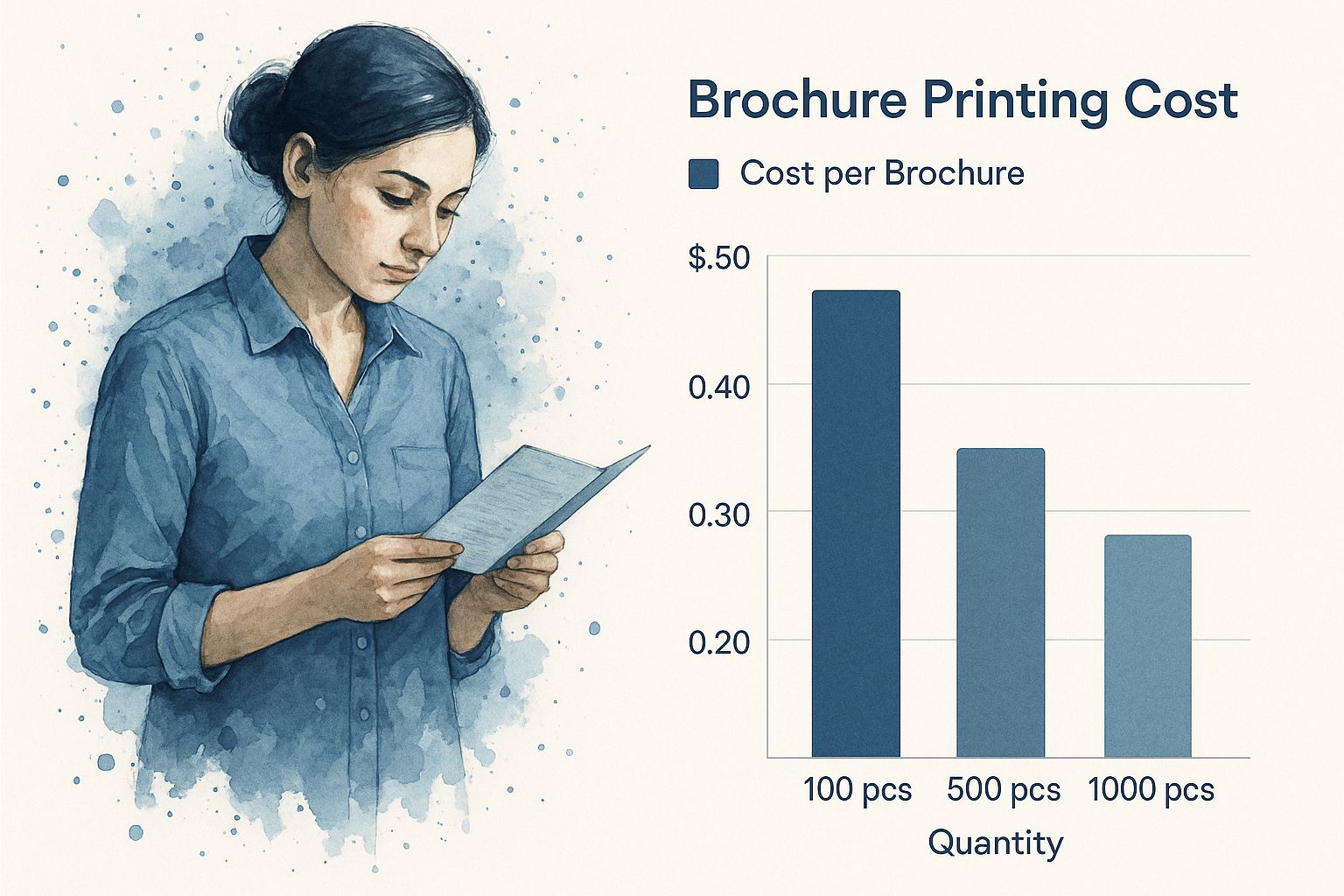
As you can see, ordering in bulk really pays off. The economies of scale kick in, making those larger print runs much more friendly to your budget.
Finalizing Your Order and Proofing Like a Pro

You’ve done the hard work—picking the perfect design, paper, and fold. Now you're at the final checkpoint before your vision for brochure printing online becomes a tangible reality. This is your last, and most critical, chance to catch any little gremlins in the design that could sabotage your entire project. Trust me, rushing this part is a classic recipe for expensive reprints and blown deadlines.
Most online printers have a pretty straightforward upload process, usually a simple drag-and-drop portal. Before you upload, double-check their accepted file types. Most prefer a print-ready PDF, but you might find some that take high-resolution JPGs or even native design files from Adobe Illustrator or InDesign. This is also your final gut-check to ensure your file is in CMYK color mode (not RGB) and that every single image is at least 300 DPI.
The Critical Art of Proofing
Once your file is uploaded, the printer sends back a digital proof. This isn't just a formality; it's a preview of exactly what will roll off the press. It is absolutely essential to review this proof with a fine-toothed comb. Think of it like a contract—the moment you click "approve," you're giving the green light and confirming everything is perfect.
Don't just give it a quick once-over. I once had a client who breezed through a proof for 5,000 trifold brochures, only to call me in a panic when they arrived. They had misspelled their own company's name in the main headline. It was a costly, embarrassing mistake that a focused, five-minute review would have completely prevented.
Think of the digital proof as your final line of defense. The time you invest here is insurance against reprinting costs, delays, and the frustration of receiving a thousand brochures with a glaring mistake.
To proof effectively, you need to go beyond a simple spell-check. It requires a systematic approach to make sure nothing slips through the cracks.
Your Essential Proofing Checklist
Open that proof and get ready to scrutinize every detail. A great little trick is to read all the text backward. It sounds weird, but it forces your brain to slow down and focus on each individual word instead of auto-correcting what it thinks it should say.
Here’s a practical checklist to guide you:
- Spelling and Grammar: Read every single word out loud. That includes headlines, body copy, and especially contact info. Are there any sneaky typos or grammatical errors?
- Image Quality: Zoom way in on all your photos and graphics. Do they look sharp and crisp, or are they getting pixelated and blurry? This is your absolute last chance to catch low-resolution images.
- Bleed and Trim Lines: Make sure all your important text and logos are comfortably inside the trim lines (the "safe zone"). Then, check that background colors or images stretch all the way to the bleed line. This prevents any ugly white slivers from appearing after the brochures are cut.
- Contact Information: This one's huge. Double-check every digit in the phone number and every letter in the email and website URL. Actually call the number and type the URL into a browser to be certain they work.
- Folds and Panels: Take a moment to visualize how the brochure will fold. Is the content on the right panel? Is anything oriented upside down or in the wrong sequence?
After you've gone through it yourself, grab a colleague or friend for a second pair of eyes. A fresh perspective is invaluable for catching things you've become blind to. Once you're both completely satisfied, you can hit that approve button with total confidence and finish your order.
Navigating Turnaround Times and Shipping
Your brochures are designed, the proof is approved, and you’re ready to hit “go.” Now comes the last leg of the journey: getting those freshly printed materials from the production floor and into your hands. This is where understanding turnaround times and shipping options becomes critical. A little bit of planning here ensures your brochures arrive exactly when you need them for that big tradeshow, product launch, or marketing blitz.
The clock on production—what we call turnaround time—doesn’t start ticking at the same speed for every order. It’s directly tied to the choices you made during the design phase. A simple run of 500 standard trifolds on 80lb glossy paper is a straightforward job that will fly through production. But if your project involves custom die-cuts, special foil stamping, or hefty cardstock, things naturally take a bit longer. Each custom feature adds machine setup and quality control steps, extending the timeline.
Balancing Speed and Budget
When you’re finalizing your brochure order online, you'll see a few different production speeds. Picking the right one is all about balancing your deadline with your budget.
- Standard Turnaround: This is your most budget-friendly choice. It’s the perfect fit when you’ve planned ahead and have plenty of breathing room before you need the brochures.
- Expedited Printing: If your timeline is getting a little tight, this option moves your job up in the queue for a reasonable fee.
- Rush Printing: For those real "we need it yesterday" emergencies, rush service is your fastest path forward. It comes at a premium, but it can be an absolute lifesaver for last-minute opportunities.
My best advice? Plan as far ahead as you possibly can. Building a few extra days into your project schedule almost always means you can go with standard turnaround, which frees up your marketing budget for other things.
From the Printer to Your Doorstep
Once your brochures are printed, QA'd, and boxed up, the final piece of the puzzle is shipping. Just like with production, you have choices that cater to different needs and budgets. Affordable ground shipping is a great default for well-planned campaigns, but you can always opt for overnight or two-day air for those must-have-it-now deliveries.
A lot of businesses also use their printing partner to handle the entire mailing process. This is a game-changer if you’re running a direct mail campaign. You can have your brochures printed and shipped directly to a list of customer addresses, skipping the whole headache of receiving, stuffing, and mailing them yourself. If you want to land your message right in your customers’ mailboxes, exploring direct mail services is an incredibly efficient move.
This whole process really shows off the power of the digital printing industry. In the United States, digitally printed advertising materials like brochures are a huge deal, accounting for about one-third of the industry's total revenue. That demand is fueled by technology that gives businesses scalable and fast solutions for their marketing. You can dig into more stats about the U.S. digital printing industry on IBISWorld.com.
Common Questions About Printing Brochures Online
Jumping into the world of brochure printing online can feel a bit overwhelming, especially if it's your first time. A few questions always seem to pop up, and getting clear, straightforward answers is the key to making sure your project goes smoothly from start to finish. Let's walk through some of the most common things we hear from businesses just like yours.
One of the first hurdles is often about file formats. So, what's the best way to send your design to the printer? Most online printers, including us, strongly prefer a print-ready PDF. This file type is fantastic because it locks in all your design elements—fonts, images, and layout—ensuring what you see on your screen is exactly what gets printed. While some places might accept a JPG or a native design file, a high-resolution PDF is always your safest bet.
Another big question revolves around how many you have to order. The beauty of modern digital printing is its flexibility. Gone are the days of massive minimums. Many services now let you order small batches, sometimes as few as 25 or 50 brochures. This is perfect for small businesses or for testing a new design without a huge financial commitment.
Can I Get a Physical Sample Before a Big Order?
That's a fantastic question, and it shows you're thinking like a pro. Getting a single, custom-printed "one-off" of your exact brochure usually isn't cost-effective for you or the printer. However, there's a great alternative: ordering a sample kit. These kits are packed with examples of different paper stocks, finishes, and fold types.
This way, you can actually feel the difference between an 80lb matte stock and a 100lb glossy cover before you commit to a full run. Holding these samples in your hand gives you a level of insight that a computer screen just can't match, helping you make a much more confident decision.
A sample kit is your best friend for bridging the gap between your digital design and the final physical product. It takes the guesswork out of the equation and ensures the feel of your brochure lives up to your brand's quality.
What Is the Difference Between a Brochure and a Booklet?
This is a key distinction that comes down to how much information you need to share. A brochure is usually a single sheet of paper that’s been folded to create different panels, like a classic trifold or a simple bifold. It’s perfect for delivering a concise, high-impact marketing message.
A booklet, on the other hand, is made of multiple pages bound together, like a small magazine or program. This format is the way to go when you have more in-depth content. For things like detailed product catalogs, company handbooks, or event programs, you can learn more about booklets and catalogs to see if that format is a better fit for your project.
Ready to create a brochure that gets noticed? At 4OVER4, we make professional brochure printing simple and affordable. Explore our options and get an instant quote today!
More from

24
If you've ever wondered about the standard gift card dimensions, there’s one number you need to know: CR80
 Emma Davis
Mar 17, 2026

32
When you’re launching a product, your bottle label is often the first thing a customer sees. Think of it as your silent salesperson
Emma Davis
Mar 16, 2026

76
When you're brainstorming ideas for landscaping business cards, it helps to think beyond just contact information. Your c
Emma Davis
Mar 15, 2026

200
When you think of a yard sign, the classic 18"x24" is probably what comes to mind. It’s the industry workhorse fo
Emma Davis
Mar 14, 2026

125
When you’re ready to invest in an A-frame sign, the first question you'll ask is, "What size do I need?" It usually comes down
Emma Davis
Mar 13, 2026

1145
The real secret to mastering your direct mail budget isn't complicated. It comes down to one simple fact: a standard 4" x 6&q
Emma Davis
Mar 12, 2026

155
Tear-off flyers are a classic for a reason. They’re a tangible marketing tool, designed with perforated, removable tabs at the bottom. Each
Emma Davis
Mar 11, 2026

276
Printing stickers at home is a seriously fun and rewarding project. It boils down to four main parts: designing your image, picking the right
Emma Davis
Mar 10, 2026