





all

    A Guide to Die Cutting Labels for Your Brand

    user icon

    Emma Davis

    Content Writer

    Nov 11, 202589 views

    Nov 11, 202589 views

    A Guide to Die Cutting Labels for Your Brand

    Think of a cookie cutter slicing through dough. That's the core idea behind die cut labels, but instead of gingerbread men, we're stamping out custom shapes from paper, vinyl, or other materials. It’s a specialized process that uses a tool called a “die” to create labels in practically any shape you can dream up, moving your brand far beyond the usual rectangles and circles.

    What Are Die Cutting Labels and Why They Work

    In a world flooded with visual noise, a standard square label can easily fade into the background. Die cut labels are the answer, transforming your product's packaging from a simple container into a powerful marketing piece. It’s like giving your brand a physical silhouette—a distinct shape that customers recognize even before they read a single word.

    This isn't just about looking good; it's a strategic move. A unique shape instantly communicates your brand's personality or what the product does. Imagine a honey jar with a honeycomb-shaped label or a hot sauce bottle with a fiery chili-pepper-shaped sticker. That visual shortcut creates an immediate, intuitive connection with the shopper, helping your product pop on a crowded shelf.

    The Power of a Unique Shape

    The real magic of die cutting is its ability to create a bespoke fit for your brand and packaging. Instead of squeezing your design into a pre-made box, you get to create a shape that perfectly complements your logo, the product container, and your overall brand story. This level of customization pays off in several key ways:

    • Boosts Brand Recognition: A consistent, unique shape becomes a memorable part of your brand identity, making it far easier for customers to spot your products.
    • Increases Perceived Value: Custom-shaped labels often signal a higher-quality, more professional product, which can help justify a premium price point.
    • Tells a Creative Story: The shape itself can tell a story, conveying playfulness, elegance, or innovation without saying anything at all.

    The real power of die cutting is that it aligns the physical form of your label with the conceptual identity of your brand, creating a seamless and impactful first impression.

    A quick look at how die cut labels stack up against the standard fare can make the choice a lot clearer.

    Die Cut Labels vs Standard Labels at a Glance

    This table breaks down the main differences, helping you see where custom shapes really shine.

    Feature Die Cut Labels Standard Labels
    Shape Fully customizable to any design Limited to pre-set shapes (squares, circles, ovals)
    Brand Impact High; creates a unique, memorable silhouette Low to moderate; relies on graphic design alone
    Initial Cost Higher due to custom die creation Lower; uses existing templates
    Visual Appeal High; stands out on shelves and products Standard; can blend in with competitors
    Best For Premium branding, unique products, promotions Budget-conscious projects, basic info, mass production

    Ultimately, while standard labels get the job done, die cut labels offer a level of personality and distinction that's hard to beat.

    A Growing Market for Customization

    The demand for packaging that does more than just sit there is on the rise. The global labels market, which includes die cutting labels, was valued at USD 52.3 billion in 2025 and is projected to hit USD 89.7 billion by 2035. This massive growth is fueled by the boom in e-commerce and a clear consumer preference for customized, premium products.

    This technology is more accessible than ever, allowing businesses of all sizes to craft a lasting impression. Explore our die cutting services to see how you can create custom labels that capture attention and build a stronger brand.

    How Custom Labels Are Actually Made

    Ever wonder how a simple digital design becomes a tangible, perfectly shaped label for your product? Pulling back the curtain reveals a fascinating process that blends precision engineering with creative flair. The method used often comes down to the project's size, complexity, and budget.

    Understanding how it's done helps you appreciate the technology behind it and, more importantly, make smarter choices for your own projects. Each technique has its own strengths, whether you need a small batch of intricate designs or a massive run of identical labels.

    Flatbed Die Cutting: Small Batches, Big Detail

    Think of a flatbed die cutter as a powerful, precise press, kind of like a high-tech cookie cutter. In this method, a flat steel rule die—the "cookie cutter"—is pressed down onto the label material with immense force, stamping out the exact shape you need.

    This technique is the go-to for smaller production runs and highly detailed or complex shapes. Because it operates with a stop-and-start motion, it’s not the fastest horse in the race, but it offers incredible accuracy. It's perfect for prototyping and premium, low-volume product labels where every single detail has to be flawless.

    This infographic shows just how much a custom shape can do to connect your brand with customers and make your products pop off the shelf.

    Infographic about die cutting labels

    As the visual points out, the real magic of a custom shape is its power to create a memorable brand impression that grabs a customer's attention from a mile away.

    Rotary Die Cutting: Speed for Large Volumes

    Now, imagine taking that flat die and curving it into a cylinder. That’s the heart of rotary die cutting. This high-speed process feeds label material continuously through rotating cylindrical dies, which slice out the shapes at an incredible pace.

    This method is the undisputed workhorse of the industry, built for large-scale production where efficiency and consistency are everything. While the initial tooling cost is higher, the per-unit price drops dramatically on massive orders. That makes it the most cost-effective solution for high-volume jobs by a long shot.

    Digital Cutting: The Modern Alternative

    Digital die cutting completely ditches the physical die. Instead, it uses a computer-controlled blade or laser to cut the label shape directly from your digital design file. This offers amazing flexibility and is perfect for short runs, prototypes, or jobs with tons of different design variations.

    With no need for a physical die, digital cutting drastically reduces setup times and costs, making truly custom shapes accessible even for small businesses and startups.

    The market is definitely leaning into this kind of automation and flexibility. The global automatic die-cutting machine market was valued at USD 1.8 billion in 2024 and is expected to hit USD 3.1 billion by 2034. A lot of that growth is fueled by the e-commerce boom, which demands huge volumes of customized packaging.

    Knowing these options helps you choose the right partner for all your custom labels printing needs.

    The Strategic Benefits of Custom Shaped Labels

    Sure, understanding the production process is helpful, but the real magic of die cutting labels is what they can do for your business. A custom shape is so much more than just a pretty design; it’s a powerful marketing tool that can boost brand recognition, make your product feel more valuable, and even solve some tricky packaging headaches.

    Think of it this way: a standard rectangular label has to rely entirely on its graphics to get a message across. But a custom-shaped label? It tells a story with its physical form before anyone even reads a single word. A hot sauce brand with a label shaped like a chili pepper instantly screams "heat and flavor." A skincare line can use labels perfectly cut to hug the curves of an unconventional jar, giving off an air of luxury and meticulous detail.

    Driving Brand Recognition and Recall

    In a crowded market, standing out is the name of the game. A unique shape acts as a powerful visual hook for your brand. When customers see your product over and over again in a distinctive silhouette—whether it's a coffee bag with a bean-shaped label or a candle with an elegantly curved sticker—that shape becomes an unforgettable part of your brand identity.

    This visual consistency is key for building brand recall. The next time a shopper is scanning a busy shelf, their eyes will naturally be drawn to that familiar shape they now associate with your product. It makes it significantly easier for them to spot you and choose you over the competition.

    Enhancing Perceived Product Value

    The effort and investment it takes to create custom die cutting labels sends a subtle but powerful message to your customers: this is a high-quality, professional product. That perception can directly influence how much they're willing to pay.

    A bespoke label implies a bespoke product. By moving beyond generic shapes, you signal to your audience that every aspect of your product has been thoughtfully considered, from the ingredients inside to the packaging outside.

    This attention to detail can justify a higher price point and build a stronger sense of trust and loyalty with your customers. It transforms a simple purchase into a more memorable brand experience. Browsing through a custom shape diecut collection is a great way to get inspired and see how a unique silhouette could elevate your own product line.

    Solving Practical Packaging Puzzles

    Beyond branding, die cutting labels offer genuinely practical solutions for difficult packaging. Let's be honest, not every product comes in a simple, flat container. You've got tapered bottles, hexagonal jars, and all sorts of uniquely shaped boxes where standard labels just won't cooperate—they wrinkle, peel, or just look awkward.

    Custom shapes fix this by being designed to conform perfectly to any surface. This ensures a clean, professional look that feels like it’s part of the product itself. As you explore these options, it's also worth looking into other innovative solutions like UV DTF stickers, which deliver durable, vibrant prints on all kinds of surfaces and offer similar benefits for unique products. Whether it's die cutting or another method, a custom fit is essential for a polished final look.

    Designing Your Die Cut Labels for Success

    Creating a die cut label that turns heads is one thing, but making sure it actually prints perfectly? That’s where the real magic happens. A flawless label is a mix of bold creative vision and rock-solid technical prep. Getting these details right from the very beginning is the secret to a professional final product and helps you dodge those costly, time-sucking production delays.

    It all starts with your artwork file. When it comes to die cutting, vector files are the only way to go. You’ll want to stick with formats like Adobe Illustrator (.AI), EPS, or vector-based PDFs. These files build shapes using math instead of pixels, which means your design can be stretched or shrunk to any size without losing an ounce of sharpness. That’s how you get those satisfyingly crisp edges every single time.

    Image

    Setting Up Your Artwork for a Clean Cut

    To get your design print-ready, you need to get familiar with two crucial concepts: the bleed and the die line. Think of them as the technical blueprints that guide the printing and cutting machines.

    • The Bleed: This is a little safety net of color or background image that extends past the final cut line. A standard bleed is 1/8th of an inch (0.125") on all sides. It’s there to make sure that even if there’s a tiny shift during the cutting process, you won’t end up with any ugly white slivers along the edge of your finished label.

    • The Die Line: This is a separate vector path in your design file that tells the machine precisely where to cut. It needs to be a single, clean, and continuous line that outlines your label’s final shape. Any gaps or overlapping points can throw the cutting equipment for a loop, so make sure it's perfect.

    The die line is the most important instruction you’ll give us. A clean, well-defined die line is what separates a sharp, professional-looking label from a sloppy one. It’s the foundation that brings your unique shape to life.

    Before you send your file off to print, it’s always a good idea to run through a quick checklist. This helps catch any small errors that could cause big problems down the line, ensuring your design is ready for a flawless production run.


    Essential Design Checklist for Die Cut Labels

    Here’s a quick rundown of the key technical and creative steps to ensure your label design is both print-ready and impactful.

    Checklist Item Why It's Important Pro Tip
    Use Vector Artwork Guarantees sharp, clean edges no matter the size. Pixels lead to blurry cuts. Save your final file as an .AI, .EPS, or vector .PDF.
    Set a 0.125" Bleed Prevents white edges from appearing if the cut is slightly off-center. Extend your background design a full 1/8th inch beyond the die line on all sides.
    Create a Clean Die Line Provides a clear, unambiguous cutting path for the machinery. Make sure your die line is a single, closed vector path on its own layer.
    Establish a Safe Zone Protects crucial text and logos from being accidentally trimmed off. Keep all important elements at least 1/16th inch inside the die line.
    Avoid Overly Complex Shapes Prevents tearing or damage during application, especially with thin points. Smooth out sharp corners and thicken any delicate parts of your design.
    Choose Legible Fonts Ensures your message is easy to read, even from a distance. Pick a clear font and make sure it’s large enough to be legible on the final product.

    Taking a few minutes to double-check these points can save you a world of frustration and ensure the labels you receive are exactly what you envisioned.

    Creative Best Practices for Impactful Designs

    Once the technical side is buttoned up, you can get back to the fun part—making your design pop. The shape you choose shouldn't just be for show; it should connect to your product and reinforce your brand's personality. Think of a honey jar label shaped like a honeycomb—it instantly tells a story.

    Just be careful not to get too carried away with complexity. Shapes with super thin pieces or sharp, pointy ends are likely to tear when the labels are applied or shipped, and that can really kill the premium vibe you're going for.

    And here’s a final tip: make sure your logo, text, and any other can't-miss info are placed safely inside a "safe zone," away from the cut line. This ensures nothing important gets lopped off by accident. If you're looking to add another layer of texture and shine, you can always explore finishing options like spot UV printed products, which can add a glossy, raised effect to make certain parts of your unique design stand out even more.

    Inspiring Examples from Different Industries

    Theory is great, but seeing die cutting labels in action is what really gets the creative gears turning. Their versatility is on full display across countless industries, where a custom shape does more than just identify a product—it tells a story, sparks an emotion, and ultimately, helps close a sale. By looking at how other brands are doing it, you can find a ton of inspiration for your own.

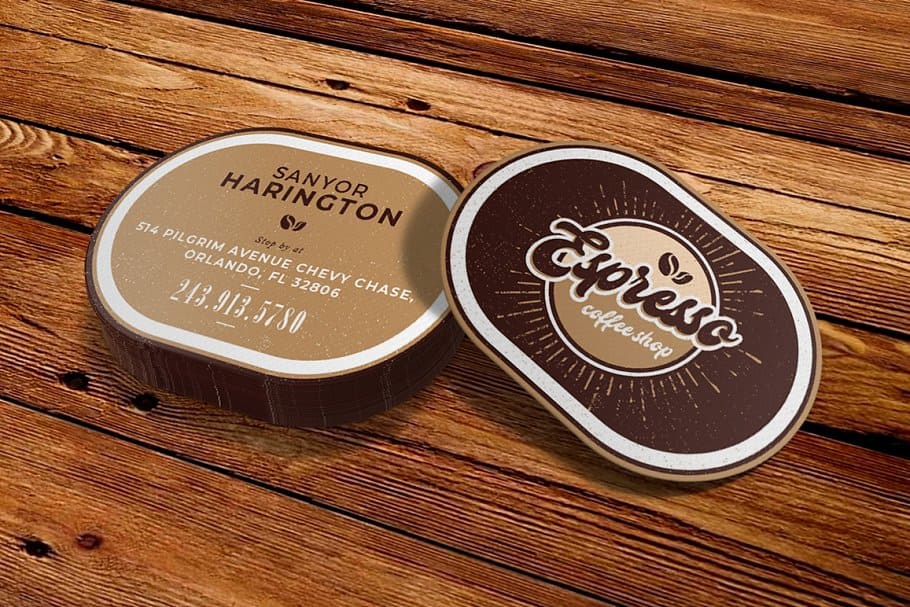
    A collection of uniquely shaped and colored die cut labels

    From the neighborhood coffee roaster to a global cosmetics giant, custom shapes help products break through the noise. Every example out there is a mini-masterclass in using clever design to solve a real-world marketing problem.

    Food and Beverage Brands

    The food and beverage aisles are a battleground, and shelf appeal is everything. Craft breweries are absolute pros at this, using die cut labels to give their bottles and cans a personality that’s impossible to ignore. Think of a rich stout with a label shaped like a barrel, or a crisp summer ale with a sun-shaped sticker.

    These shapes are anything but random; they're completely strategic. They broadcast flavor profiles and brand vibes before a customer even reads the name. A honeycomb-shaped label on a jar of honey instantly suggests natural, pure sweetness, while a chili-shaped sticker on a bottle of hot sauce is a clear—and fun—warning of the heat inside.

    Cosmetics and Personal Care

    In the beauty world, the package is just as important as the product inside, signaling luxury and quality. Die cut labels let brands create that seamless, high-end look that a standard rectangle just can't deliver. A skincare company, for example, might use a label cut perfectly to hug the curved lid of a jar, making it feel like an integrated, premium part of the container itself.

    The goal is to make the label feel like an intentional part of the container, not just something stuck on as an afterthought. This attention to detail elevates the entire product experience.

    Imagine a floral-scented lotion featuring a label cut into the delicate shape of a flower petal. This instantly reinforces the product’s main ingredient and scent profile. This kind of visual storytelling helps justify a higher price point and builds a much stronger connection with shoppers.

    Retail and Promotional Products

    Retailers lean on die cut labels to create price tags, promo stickers, and hang-tags that stop shoppers in their tracks. A clothing boutique might design a hang-tag in the shape of its logo, reinforcing its brand identity right at the point of sale. Around the holidays, a simple star-shaped sticker can instantly make any item feel festive and ready to be gifted.

    The demand for these kinds of custom solutions is booming. The global market for die cutting services, which includes custom label production, was valued at USD 20 billion in 2023. It’s projected to hit USD 25 billion by 2031. This growth shows just how much brands are investing in unique packaging to get noticed.

    Whether you're thinking of a simple, clean design or something more intricate, there are plenty of options. You can explore a huge variety of online labels to find the perfect match for your vision.

    How to Order Your Custom Labels

    So, you're ready to turn your design into a real, tangible label? Perfect. This last part of our guide is all about making that happen. Think of this as your roadmap, walking you through the ordering process from start to finish—no guesswork involved.

    We'll cover picking the right materials, adding that final finishing touch, and getting your artwork uploaded correctly. The goal here is to make the entire process feel simple and clear, so you can confidently order labels that look professional and do your brand justice. Let’s start with the foundation of any great label: the material.

    Selecting the Right Material and Finish

    The material you choose is more than just a background for your design; it’s the workhorse that ensures your label survives in the real world. Think about where your product will live. Will it be chilling in a fridge, sitting on a steamy bathroom shelf, or coming into contact with oils?

    • BOPP (Biaxially-Oriented Polypropylene): This is your go-to for durability. It’s a tough, plastic-based material that’s both waterproof and oil-resistant. That makes it the perfect choice for things like shampoo bottles, hot sauce jars, or anything else that might face moisture. It comes in clear, white, or even a flashy metallic option.
    • Paper Labels: A classic for a reason. Paper is a fantastic, budget-friendly option for dry goods, boxes, or any product that won’t be exposed to the elements. With different textures available, paper labels can give your packaging a more rustic or eco-conscious feel.

    Once you’ve locked in the material, the finish is what brings the look home. A gloss finish will make your colors practically jump off the label with a vibrant shine. On the other hand, a matte finish offers a more subtle, non-reflective look that feels modern and sophisticated.

    Take a look at the 4OVER4 ordering page—this is where you'll make these key decisions for your labels.

    As you can see, everything is laid out with simple dropdowns for size, material, finish, and quantity. It’s designed to be straightforward.

    Uploading Your Artwork and Proofing

    With the physical specs decided, it’s time for the creative part: your artwork. As we talked about earlier, you'll want to upload a print-ready vector file (like an .AI or .EPS). Make sure it includes both a bleed and a clean die line on its own layer. This is the secret to getting a super crisp print and a perfectly precise cut.

    After you upload, we'll send you a digital proof. This is your last chance to be a detective. Check every single detail—spelling, colors, and especially the placement of the die line—before we hit the print button. Seriously, give it a good, hard look.

    This proofing step is your safety net. It protects you from any "oops" moments or costly mistakes. Once you give it the thumbs-up, your custom die-cut labels are officially headed to production and will be on their way to you before you know it. The whole system is built to make sure what you see on the screen is exactly what you get in your hands.

    Common Questions About Die Cut Labels

    When you're jumping into the world of custom labels, a few questions always seem to pop up. Nailing down these details from the start will give you the confidence to design and order exactly what your brand needs. Let's walk through some of the most common things people ask.

    Die Cut vs. Kiss Cut Labels

    One of the first hurdles is figuring out the difference between die cutting and kiss cutting. The best way to think about it is with cookies. A die cut label is like a cookie that’s been completely punched out of the dough, backing and all. You get a stack of individual, custom-shaped labels, which is perfect for handing out or slipping into product packaging.

    A kiss cut, on the other hand, is a much gentler process. The blade just "kisses" the top layer, cutting through the label material but leaving the backing paper completely intact. This is how sticker sheets are made, giving you multiple designs on one page that customers can peel off easily.

    Die Cut: Slices through both the label and the backing paper to create individual, custom-shaped pieces.

    Kiss Cut: Slices only the label material, leaving it on a larger backing sheet, ready to be peeled.

    Is There a Minimum Order for Custom Shapes?

    In the old days, getting a custom shape meant paying for a physical metal die to be created. That was a big upfront cost, which made small orders of unique labels pretty much impossible for most businesses. But that’s all changed, thanks to digital die cutting technology.

    Digital cutters work more like a plotter, using a computer-guided blade instead of a clunky metal die. Because there’s no expensive physical tool to create, the setup is incredibly simple and cheap. This means small-batch orders for die cut labels are not only doable but also surprisingly affordable. You don’t have to order thousands of labels just to get a cool shape anymore, which is a huge win for startups, limited edition products, or special events.

    Can Any Shape Be a Die Cut Label?

    While the technology is incredibly flexible, there are a few practical limits to keep in mind. You can create just about any shape you can dream up, but things get tricky with designs that have super thin, sharp, or intricate points. These delicate little areas are a nightmare for production—they tend to rip or tear, either during the cutting process or when someone tries to apply the label. The last thing you want is for your cool design to look cheap because it’s falling apart.

    To get a clean, professional finish, it’s always better to stick with smooth curves and avoid overly complicated edges. Your artwork needs a crisp, well-defined die line so the cutting machine has a sturdy and clear path to follow.


    Ready to turn your unique vision into a reality? At 4OVER4, we make ordering custom die cut labels straightforward and quick. Explore our options and get an instant quote today.

    More from die cutting labels

    Finding the Ideal Size of a Poster in Pixels
    story
    Finding the Ideal Size of a Poster in Pixels

    9

    If you're designing a standard 18x24 inch poster, you’ll want a file that’s 5400 x 7200 pixels to ge

    author avatarEmma Davis

    Jan 11, 2026

    Create Outlines in Illustrator A Guide to Flawless Print-Ready Files
    story
    Create Outlines in Illustrator A Guide to Flawless Print-Ready Files

    48

    When you hear a designer talk about "creating outlines in Illustrator," they're referring to one of two things: converting live

    author avatarEmma Davis

    Jan 10, 2026

    The Difference Between Matte and Glossy Print Finishes
    story
    The Difference Between Matte and Glossy Print Finishes

    27

    The real difference between matte and glossy boils down to a single element: light. How does the paper's surface interact

    author avatarEmma Davis

    Jan 9, 2026

    Screen Print Vs Vinyl A Guide to the Best Printing Method
    story
    Screen Print Vs Vinyl A Guide to the Best Printing Method

    23

    When you're trying to decide between screen printing and vinyl, the choice really boils down to two things: volume and design. If you'

    author avatarEmma Davis

    Jan 8, 2026

    How to Print Business Cards That Actually Get Noticed
    story
    How to Print Business Cards That Actually Get Noticed

    42

    Printing a business card might seem straightforward, but a handful of small details are what separate a truly memorable card from one that get

    author avatarEmma Davis

    Jan 7, 2026

    Finding the Best Font for Flyers to Elevate Your Design
    story
    Finding the Best Font for Flyers to Elevate Your Design

    47

    When you need to make an impact fast, your font choice is everything. For flyers, you can't go wrong with timeless, readable options like

    author avatarEmma Davis

    Jan 6, 2026

    A Practical Guide to Business Card Design Online
    story
    A Practical Guide to Business Card Design Online

    51

    In a world drowning in digital pings and overflowing inboxes, the humble business card is more powerful than ever. It's a real handshake,

    author avatarEmma Davis

    Jan 5, 2026

    Your Ultimate Guide to Typical Banner Sizes
    story
    Your Ultimate Guide to Typical Banner Sizes

    45

    It's a classic question we get all the time: "What's a typical banner size?" The honest answer? There really isn't one u

    author avatarEmma Davis

    Jan 4, 2026

    Home
    Products
    Favorites
    Cart
    Account