






Emma Davis
Content Writer
Jan 5, 202648 views
Jan 5, 202648 views

In a world drowning in digital pings and overflowing inboxes, the humble business card is more powerful than ever. It's a real handshake, a physical piece of your brand that someone can actually hold, feel, and remember long after the meeting is over. When you learn how to handle business card design online, you're not just making a contact sheet—you're crafting a first impression that sticks.

It’s easy to think that with LinkedIn and QR codes, the old-school business card is a relic. But that small piece of paper carries a surprising amount of professional weight. It shows you’re prepared, you’re serious, and you’re interested in building a real relationship. A digital request can get lost in the noise, but a physical card is a direct, personal touch.
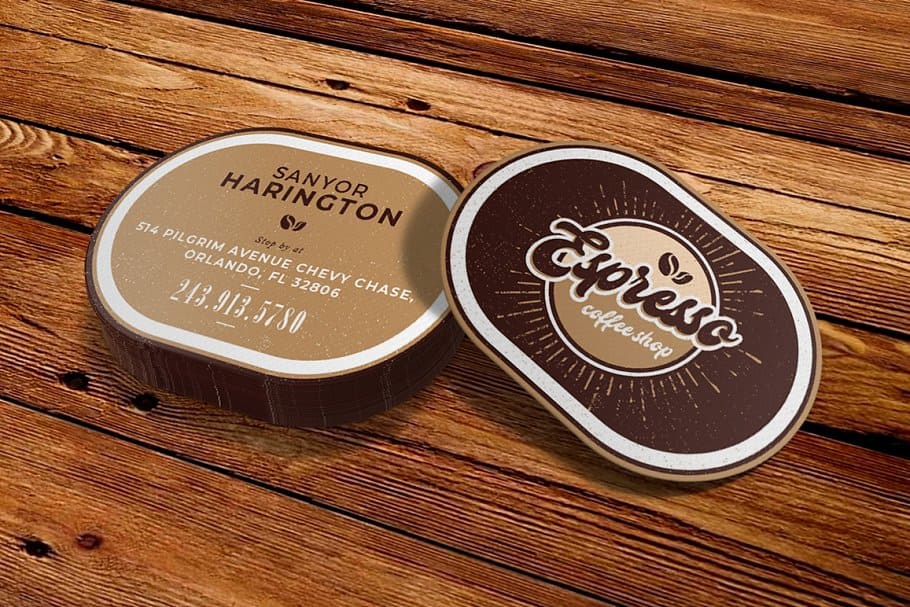
A well-designed card does more than just share your info; it speaks volumes about your brand. It’s your chance to stand out at a crowded networking event or leave a memorable artifact behind after a pitch. Imagine a freelance graphic designer whose card has a unique die-cut shape and bold colors—it instantly screams creativity before anyone even sees their portfolio.
The impact of a business card isn't just a gut feeling; the numbers back it up. We’ve all been there—judging a book by its cover. The same goes for business cards.
To put it in perspective, take a look at these stats. They really highlight how a small investment in design can pay off big time.
| Statistic | What It Means for Your Business |
|---|---|
| 72% of people judge a company by its business card | A quality card instantly builds credibility. A flimsy one does the opposite. |
| 39% will refuse to do business with someone who has a cheap-looking card | That's nearly four out of ten potential clients you could lose before you even start talking. |
These figures show that handing over a poorly designed card is more than a missed opportunity; it can actively harm your business. Investing in quality business card design online is a smart, low-cost marketing move with a potentially massive return. The right card keeps selling for you long after you've left the room.
A business card is more than just a piece of paper; it's a physical reminder of a personal connection. In a digital-first world, that tactile experience is more memorable and valuable than ever.
A great business card takes your online brand and makes it real. It gives you total control over that first impression through smart choices in paper, finish, and typography.
Think about these real-world examples:
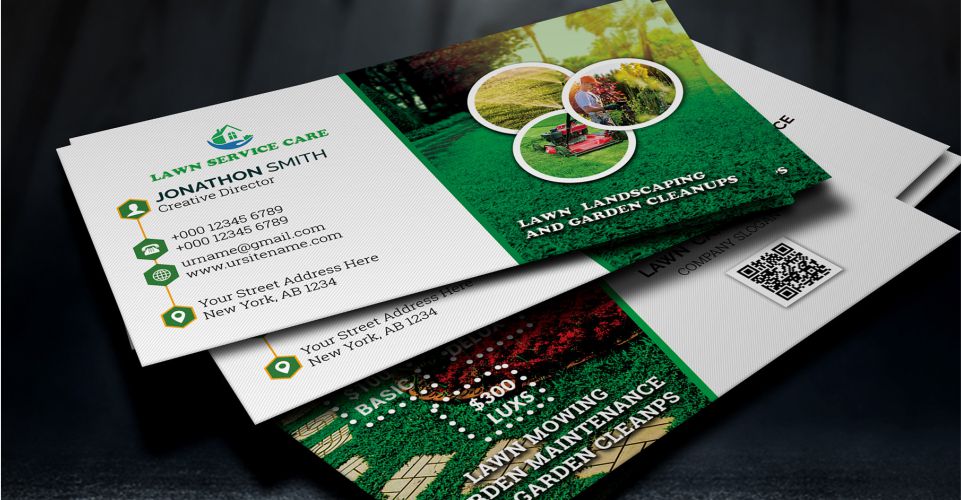
Each of these examples shows how the physical qualities of a card tell a story. By exploring the huge range of business cards printing options available, you can find the perfect mix to represent your brand and make every introduction count. It's your first chance to prove you sweat the details.

Jumping straight into an online design tool without a plan is a recipe for frustration. I've seen it happen countless times. A great business card isn’t just a random collection of your contact details; it’s a tiny, powerful piece of your brand.
Before you even glance at a template, take a moment to gather your core brand ingredients. Trust me, this prep work makes the entire business card design online process smoother, faster, and way more effective.
This little bit of planning ensures your final card is consistent, professional, and authentically you. If you have one, a corporate style guide is your best friend here. Think of it as your north star, guiding every single design choice. In fact, developing a corporate style guide is one of the smartest moves any growing business can make.
Not all information is created equal, especially on a tiny 3.5 x 2-inch canvas. Your first real task is to decide what's absolutely essential. This is your information hierarchy—basically, a ranked list of what someone needs to see first.
What’s the main goal of your card? Is it to get phone calls? Drive traffic to your website? Get people to follow you on Instagram? The answer to that question will shape your call-to-action (CTA) and tell you what gets top billing.
A local bakery, for example, would consider its physical address a Tier 1 item. For a freelance web developer? It might not even make the list. You have to be ruthless here to avoid a cluttered, confusing design.
Your business card isn’t your resume; it's a headline. Its job is to start a conversation, not tell your whole life story. Keep it clean and focused on a single, powerful action.
Once you know what you're going to say, you need the visual elements to bring it to life. Having these files ready to go and correctly formatted will save you a world of headaches and prevent common printing disasters, like a fuzzy, pixelated logo.
Here’s your quick asset checklist:
Do yourself a favor and organize all of these into a dedicated folder before you start your business card design online. It’s a simple step that makes a huge difference. And if you're just starting out and need some inspiration, checking out a business basics collection can spark some ideas for other essentials that will go perfectly with your new cards. This foundational work is what ensures your card will be a true reflection of your brand, ready to make a great impression.

A great business card speaks volumes before anyone reads a single word. How you arrange the text and graphics—the layout and typography—are the silent storytellers of your brand. They guide the eye and instantly shape someone's perception of your professionalism.
This is where the magic of business card design online really comes alive. It's not just what information you include, but how you present it. A good layout feels intuitive, making your details easy to absorb at a quick glance.
Visual hierarchy is just a fancy way of saying you need to arrange things to show what's most important. For a business card, that’s almost always your name and your company's name. They need to stand out first.
Think of it like a newspaper. The massive headline grabs you, then the smaller subheadings, and finally the body text. Your card should follow the same logic.
So, how do you pull this off?
A classic rookie mistake is making everything the same size. This forces people to hunt for the information they need. A strong hierarchy makes your card scannable and user-friendly.
What you don’t put on your card is just as crucial as what you do. Negative space (or white space) is simply the empty area around your text and logo. It’s the breathing room that keeps your design from looking cluttered and chaotic.
A card packed to the edges with information just looks desperate and unprofessional. In contrast, plenty of negative space signals confidence and sophistication. It isolates the key information, making it easier to read and giving the whole design a clean, high-end feel.
Don't be afraid of empty space. It’s an active and powerful element in your design. A minimalist layout with plenty of white space often has a bigger impact than a cluttered one.
For instance, a luxury brand might just have a tiny logo and one line of contact info floating in a sea of clean background. That intentional emptiness screams "premium" without saying a word.
Typography is your brand's voice. The fonts you pick have a real psychological impact. Are you a cutting-edge tech startup, a reliable financial firm, or a creative photographer? Your fonts should reflect that vibe.
When you're doing your business card design online, stick to two fonts at most. Any more and it starts to look messy. A great strategy is pairing a bold sans-serif for your name with a clean, readable serif for your contact details. The contrast works wonders.
It doesn’t matter how cool your font is if nobody can read it. On the small canvas of a business card, legibility has to be your number one priority.
Here are a few hard-and-fast rules to live by:
By getting these layout and typography fundamentals right, you’ll create a card that not only looks fantastic but works incredibly hard for your brand.
Jumping into a modern online design tool can feel a bit like being handed the keys to a professional studio. It's exciting, but all those buttons and options can also be overwhelming. The trick isn't to stare at a blank canvas and panic; it's to see the tool as your guided partner in the design process. With a smart approach, you can create a business card that genuinely looks like it was crafted by a seasoned pro.
It really all boils down to how you use templates. A good template isn't a cookie-cutter solution—it’s a professional foundation built on solid design principles like visual hierarchy and proper spacing. Your job is to pick one that vibes with your brand and then tweak it until it’s undeniably you.
The sheer number of templates available can feel like a tidal wave. Don't just scroll endlessly. Filter your search with a specific goal in mind. Are you a minimalist tech startup that needs something sharp and clean? A photographer who needs a layout that puts an image front and center? Maybe you’re a consultant who needs a design that screams "trustworthy and established."
Look for a template that already respects your information hierarchy. If your main goal is driving traffic to your website, find a layout that gives the URL prime real estate. If you have an intricate logo, you'll want a more minimalist template that gives it plenty of room to shine. Don’t just pick a design you like—pick one that works for the information you have.
Here’s a glimpse of what a typical online designer interface looks like, similar to the one we have at 4OVER4.
As you can see, a visual editor lets you directly click, drag, and edit text, images, and other elements, giving you total hands-on control to make a template your own.
Once you’ve chosen your starting point, the real fun begins. This is where you inject your brand’s personality and transform the template from a generic layout into your personal calling card. Think of it like moving into a new apartment—the layout is solid, but you need to paint the walls and bring in your furniture to make it feel like home.
Your workflow for customizing a template should hit these key points:
The goal of using a template isn't to find one that's perfect out of the box. The goal is to find one that's 80% there, allowing you to add the final 20% that makes it unmistakably yours.
Most online design tools are built on a system of layers. Picture them as clear sheets stacked on top of each other. Your background might be the bottom sheet, with your logo on the one above it, and your text on the very top layer.
Getting the hang of layers is a total game-changer for designing efficiently. It lets you:
Spending just a few minutes familiarizing yourself with the layers panel will save you a ton of time and headaches. It’s easily the most powerful feature for getting a clean, professional layout in any business card design online tool.
And if you’re looking for a little inspiration or some pre-built options you can customize in a snap, checking out a library of ready-made products can be a fantastic way to kickstart any project. When you get comfortable with these tools, you really do put the power of great design right in your own hands.
So, you’ve designed a business card on screen that looks absolutely killer. That’s a huge first step, but it's only half the journey. The real magic—and potential for mistakes—happens when your digital file hits a printing press. This is where a little technical know-how goes a long way, ensuring the card in your hand looks just as sharp as the one on your monitor.
Trust me, understanding a few core printing concepts is the secret to avoiding those frustrating (and expensive) reprints. It lets you hand over your file with total confidence, knowing you’ve done everything right.
The last few steps in any online design tool are all about finalizing the file for print, just like this.

It’s a simple flow: start with a layout, make it your own, and then get a file that’s ready for the presses.
If you only learn three technical terms today, make them these. Getting bleed, trim, and safe area right is absolutely non-negotiable for a professional finish. Think of them as the guardrails that protect your design from the physical realities of the printing and cutting process.
Why is this so critical? Paper can shift slightly during printing, and cutting machines, while precise, have a tiny margin of error. The bleed ensures that if the cut is a hair off, you won’t see an ugly white sliver along the edge. The safe area is your insurance policy against any crucial text getting trimmed off.
Here’s a hard truth: the vibrant colors on your backlit monitor look different than ink on paper. Screens and printers use completely different color systems, and not accounting for this is one of the most common rookie mistakes.
RGB vs. CMYK
Your screen creates color by mixing light using an RGB (Red, Green, Blue) model. Professional printers, on the other hand, mix ink using a CMYK (Cyan, Magenta, Yellow, Black) model. If you send an RGB file to a printer, their software has to guess how to convert it, which often leads to dull, muddy, or just plain wrong colors. Always start your design in CMYK mode if you can.
Resolution Matters
For any images or logos to look crisp, they need to be high-resolution. The industry standard for print is 300 DPI (dots per inch). An image that looks perfectly fine on your 72 DPI monitor will turn into a pixelated, blurry mess when printed.
To make sure your file is set up for success, we've put together a quick checklist. Run through this before you hit "export."
| Technical Element | Requirement | Why It Matters |
|---|---|---|
| Color Mode | CMYK (not RGB) | Ensures the colors you see on screen are accurately reproduced in print without unexpected shifts. |
| Resolution | 300 DPI for all images/logos | Guarantees your graphics will be sharp and clear, not pixelated or blurry. |
| Bleed | 0.125 inches on all sides | Prevents white edges on your final card if the cut is slightly off. |
| Safe Area | 0.125 inches from trim line | Protects all your important text and logos from being accidentally cut off. |
| File Format | High-Quality PDF | The industry standard that embeds fonts, preserves colors, and includes bleed settings reliably. |
Once you’ve ticked these boxes, you’re in great shape to export a file that any professional printer will love.
With your layout, colors, and resolution dialed in, the last step is to export your design correctly. Many online design tools will handle the technical settings for you, but it’s still smart to know what a good file looks like. For anyone getting started, it’s worth reviewing some basic artwork submission tips for beginners.
Here at 4OVER4, like most printers, we prefer a high-quality, print-ready PDF. A properly made PDF locks everything in place—it embeds your fonts, keeps the CMYK color profile, and includes the bleed. It's the gold standard for a reason. Getting this right isn't just about quality; it helps reduce waste. With 88% of the over 8 billion business cards printed each year getting thrown out in a week, a well-designed, high-quality card has a much better shot at being kept.
Our advanced https://www.4over4.com/printing/category/digital-printing services are designed to ensure every card you create makes a fantastic—and lasting—impression.
Even with the best online tools in front of you, a few questions always seem to pop up during the design process. Getting straight answers to these common hurdles can be the difference between a good card and a great one. Let’s tackle the most frequent questions to help you nail the final product.
At a bare minimum, your card needs to be a direct line to you and your business. That means your name, company name, title, a primary phone number, and a professional email address. In this day and age, your website is also non-negotiable—it’s the digital front door to everything you do.
Beyond the essentials, you have to get strategic to avoid a cluttered mess.
The goal isn't to list every possible way someone can find you. It's about curating the information to steer the conversation exactly where you want it to go.
The physical feel of your card says just as much as the design itself. The paper stock and finish you choose should feel like an extension of your brand’s personality. A flimsy, generic card feels instantly forgettable, while a premium, heavy stock makes a statement about quality and attention to detail before a single word is read.
Think about the story you're telling. A thick, uncoated kraft paper might signal an earthy, organic brand. On the other hand, a sleek, glossy finish feels modern and makes vibrant, photo-heavy designs pop. A smooth matte finish offers a sophisticated, glare-free look that’s perfect for elegant, minimalist layouts.
A business card is a sensory experience. The weight of the paper and the texture of the finish are powerful, non-verbal cues that shape a person's perception of your brand before they even read your name.
Specialty options can elevate your card from a simple piece of contact info to a memorable keepsake. For a deeper dive into what’s possible, exploring some of the fantastic finishes available for printing can spark some incredible ideas. Touches like spot UV (a glossy highlight on a matte card) or metallic foil stamping can add a premium feel that gets you noticed and makes your card incredibly hard to throw away.
When it comes to business card design online, a few classic slip-ups can completely undermine an otherwise solid effort. The single biggest mistake is clutter—trying to cram way too much information into a tiny 3.5" x 2" space. It just creates a card that’s impossible to read and instantly overwhelming.
Here are a few other frequent errors to watch out for:
Absolutely. A QR code is a fantastic way to bridge the gap between your physical card and your digital world. It gives someone an instant, friction-free way to take the next step—whether that's visiting your portfolio, connecting on LinkedIn, or watching a product demo.
If you decide to add one, just follow a few best practices to make sure it works perfectly. First, make it large enough to be easily scanned; 0.5 x 0.5 inches is a safe minimum. Second, ensure there's high contrast between the code and the background. A black code on a white or light-colored background is always your best bet.
Most importantly, test the QR code with several different phones before you approve your design for print. You need to be 100% sure it goes exactly where you want it to.
32
When you hear a designer talk about "creating outlines in Illustrator," they're referring to one of two things: converting live
Emma Davis
Jan 10, 2026
25
The real difference between matte and glossy boils down to a single element: light. How does the paper's surface interact
Emma Davis
Jan 9, 2026
21
When you're trying to decide between screen printing and vinyl, the choice really boils down to two things: volume and design. If you'
Emma Davis
Jan 8, 2026
41
Printing a business card might seem straightforward, but a handful of small details are what separate a truly memorable card from one that get
Emma Davis
Jan 7, 2026
47
When you need to make an impact fast, your font choice is everything. For flyers, you can't go wrong with timeless, readable options like
Emma Davis
Jan 6, 2026
44
It's a classic question we get all the time: "What's a typical banner size?" The honest answer? There really isn't one u
Emma Davis
Jan 4, 2026
156
Choosing the right size for your print poster isn't just a minor detail—it's the first real decision you make in a campaign, and it
Emma Davis
Jan 3, 2026
85
If you've ever planned a direct mail campaign, you know one of the first questions is always about size. The most common, go-to st
Emma Davis
Jan 2, 2026