Table of Contents
- Home
- content hub
- How to Set up a Unique Foldover Business Card in Photoshop
 Share and earn
How to Set up a Unique Foldover Business Card in Photoshop

Feb 16, 20214899 views
Feb 16, 20214899 views
When it comes to making a lasting impression in the business world, having a unique business card can make all the difference. Folded cards are a great way to stand out and offer a creative twist on the traditional business card. In this article, we will explore how to create and print your own unique fold-over business cards, along with the benefits they can bring to your brand. To create your own fold-over business cards, you will need to start by choosing a design that represents your brand and message.
Consider using a graphic designer to help bring your vision to life. Once you have a design in mind, you can use online printing services or local print shops to bring your cards to fruition.When designing your fold-over business cards, make sure to include all essential information, such as your name, title, company name, contact information, and any other relevant details. You can also use the inside of the card to showcase additional information, such as a brief bio, services offered, or a unique selling proposition.
Where can I find templates for designing folded business cards?
You can find business card templates for folded business cards online from various printing services or graphic design websites like 4OVER4.com. These templates provide guidelines on where to place your content to ensure proper folding and a professional finish.
How to Create Unique Fold-over Business Card Designs
One of the easiest ways to come up with a creative design for your folded business card is by using business card templates for inspiration. These templates can provide you with the basic layout and design elements that you can customize to suit your brand.
Once you have a design in mind, consider professional digital printing services to bring your vision to life. These services can ensure high-quality printing and precise cutting for your fold-over business cards.
To add a unique touch to your cards, you can explore different stock and cardstock options. Choosing the right paper can enhance the overall look and feel of your business cards, making them more memorable to recipients.
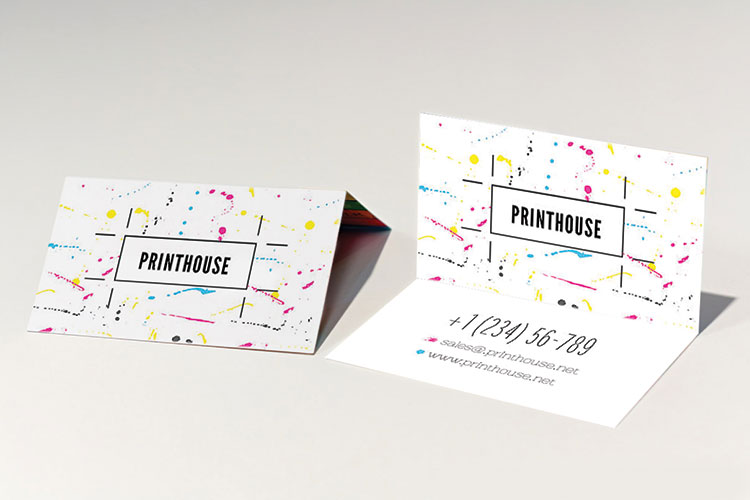
Printing Techniques for Fold-over Business Cards
When it comes to printing your fold-over business cards, understanding the different finishes is crucial. Matte and gloss finishes offer different aesthetics, so choose one that aligns with your branding and design. Here are some popular printing techniques for fold-over business cards:
- Offset Printing: This traditional printing method uses plates and ink to transfer the design onto the paper. It produces high-quality printing with sharp images and vibrant colors.
- Digital Printing: This modern printing method uses digital files to reproduce the design onto the paper. Digital printing is ideal for small print runs and offers fast turnaround times.
- Foil Stamping: Foil stamping adds a metallic finish to your business cards, creating a luxurious and eye-catching look. You can choose from a variety of foil colors to enhance your design.
- Embossing or Debossing: These techniques create raised (embossing) or recessed (debossing) text or designs on your business cards. Embossing and debossing add a tactile element to your cards and make them stand out.
- Spot UV Coating: Spot UV coating involves applying a glossy, raised finish to specific areas of your business cards, such as logos or images. This technique adds depth and visual interest to your design.
- Die Cutting: Die cutting allows you to create unique shapes and designs for your fold-over business cards. You can choose from a variety of cutting options to create a custom look that reflects your brand.
Consider the overall design and branding of your business when selecting a printing technique for your fold-over business cards. The right finish can enhance your design and make a lasting impression on potential customers.
Additionally, selecting the right cardstock and paper weight (pt) is important for the durability and appearance of your folded business cards. Consider options like 14 pt cardstock for a sturdy yet elegant finish.
For added flair, explore coating options such as full-color, UV, and high gloss coatings. These coatings can enhance the visual appeal of your business cards and make them more eye-catching.
Benefits of Fold-over Business Cards
Folded business cards offer twice the space of a standard business card, allowing you to include more information about your brand, products, or services. This extra space can make your cards more impactful and memorable to recipients.
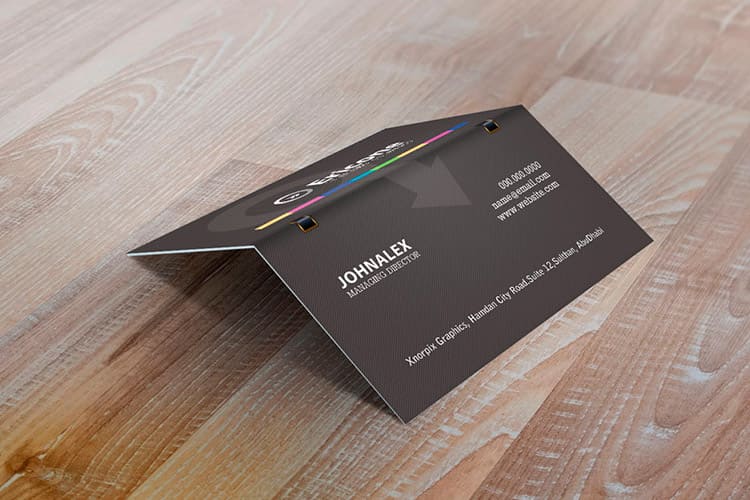
By customizing and designing unique fold-over business cards, you can showcase your creativity and attention to detail. Consider incorporating elements like unique folds, die-cut shapes, and embossed finishes to make your cards truly stand out.
Printing considerations such as durability and finish are crucial for a professional look. Ensure that your folded business cards are made with high-quality materials and finishes to leave a lasting impression on anyone who receives them. For more information, you can read on how to format your business cards on 4OVER4.com
FAQs
Q: How can I create a unique fold-over business card using Photoshop?
A: To design a unique fold-over business card, you can set up a custom template in Photoshop by creating a design that folds neatly along the designated fold lines. Be sure to use high-quality images, interesting fonts, and incorporate your branding elements effectively.
Q: What is the benefit of using folded business cards for my business?
A: Folded business cards provide twice the space for information compared to standard business cards. This allows you to include more details about your services, products, or contact information, making them more versatile and impactful.
Q: What are the common paper types used for printing folded business cards?
A: The most common paper types for folded business cards include 16 pt stock with options for matte or glossy finishes. You can also choose coated or uncoated paper depending on the look and feel you want to achieve.
Q: How long does it take to receive my folded business cards after ordering?
A: The turnaround time for folded business card printing varies depending on the printing service. Some providers offer next business day or even same-day printing options, while others may take a few business days to process and ship your order.
Q: Do folded business cards come with free shipping?
A: Some printing companies offer free shipping as part of their promotions or for orders that meet specific criteria. It's best to check with the printing service regarding any ongoing offers or deals that include free shipping for folded business cards.
Q: How can I ensure that my folded business cards stand out from the competition?
A: To make your folded business cards stand out, focus on creating a visually appealing design that reflects your brand identity. Use high-quality printing techniques, unique finishes like UV coating or matte finish, and consider adding special details like embossing or foil stamping.
More from

18
At its core, 10 pt cardstock is a versatile, lightweight paper perfect for a huge range of professional printing projects. Th
 Emma Davis
Apr 1, 2026

38
Picking the right type of paper can feel like a secret language, full of strange terms like GSM, cover, and coated. It's
Emma Davis
Mar 31, 2026

64
A printing cost calculator is an online tool that gives you instant, real-time price quotes for custom print jobs. It takes all the guesswork
Emma Davis
Mar 30, 2026

199
Getting your flyer design from a digital concept into a customer's hands involves a few key stages. You’ll need to nail the design with
Emma Davis
Mar 29, 2026

59
A quick free label template download is often the single fastest way to get professional-looking packaging without needing to
Emma Davis
Mar 28, 2026

70
Eco-friendly packaging isn't some fringe trend anymore. It’s a core part of how smart businesses build their brand and earn customer loy
Emma Davis
Mar 27, 2026

66
So you need a custom banner printed. The first question that pops into your head is probably, "Where do I even go for this?" You’v
Emma Davis
Mar 26, 2026

142
Ever wondered what are carbonless forms and how they create perfect copies without that messy blue paper? Think of them as th
Emma Davis
Mar 25, 2026